
Printer/Fax/Scanner/Copier Operating Instruction
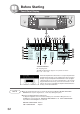
Table Of Contents
- Getting To Know Your Machine
- Before Starting
- Making Copies
- Function
- Accessories
- Network Scanner (Option)
- Problem Solving
- Others
- Specifications
- DP-3530/4530/6030 (Copier)
- i-ADF (Standard)
- System Console 1 (DA-DS603)
- System Console 2 (DA-DS604)
- 3000-Sheet Tray (LCT) (DA-MA301)
- Letter-R/Legal Size Adaptor for LCT (DA-TK31)
- 2-Bin Finisher (DA-FS600)
- 2-Bin Saddle-Stitch Finisher (DA-FS605)
- Punch Unit (DA-SP31)
- 2-Bin Finisher (DA-FS330)
- 1-Bin Saddle-Stitch Finisher (DA-FS355A)
- Punch Unit (DA-SP41)
- Options and Supplies
- INDEX
- Specifications
32
Before Starting
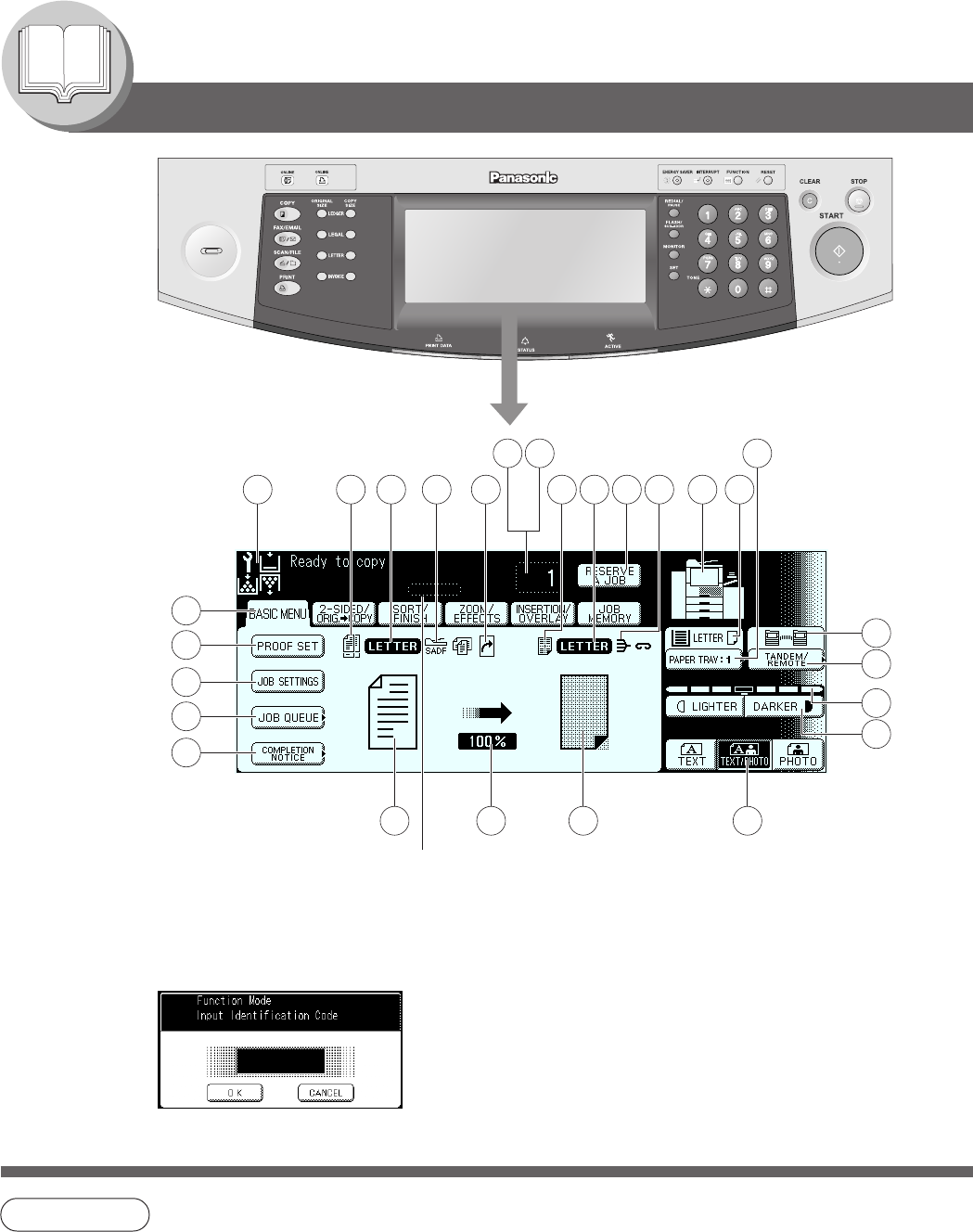
Touch Panel Display
DP-6030
1 2 3 4 5 9
10
2022 21
12
15
16
18
19
26
25
24
23
27
13
14
11
8
6 7
17
NOTE
● Use only gentle finger pressure to activate the Touch Panel Display. DO NOT USE SHARP
OBJECTS such as pens, fingernails etc., as this may damage the panel.
● Touch Panel Display Brightness Adjustment:
To adjust the brightness of the Touch Panel display, press and while holding down the "C"
(CLEAR) key, keep pressing the "ORIGINAL SIZE/LEDGER" or the "COPY SIZE/LEDGER"
keys until the desired brightness is achieved.
ORIGINAL SIZE/LEDGER : Dimmer
COPY SIZE/LEDGER : Brighter
Job Status Indicator
Ex.: Copying 3 sets.
The Indicator displays the progress of a job task as follows:
0/3 → 1/3 → 2/3 → 3/3
When the Department Counter function is set up, the departmental
Identification Code input screen is displayed on the Touch Panel
Display. A registered departmental Identification Code (4-digit) is
required to gain access to each secured function, or the secured
Copy/Fax/Scanner function(s) cannot be used. Please consult
with the key operator regarding the departmental Identification
Code(s) for the desired function.