
Operation Manual




40
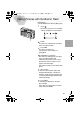
Here the white set mode of white balance
is explained.
1
Press the [MENU] button.
2
Press
3/4
to
select [W.BALANCE].
3
Press
2/1
to
set to white set [ ].
4
Press the [MENU] button.
• The menu will disappear.
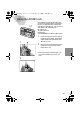
Only when setting the white balance again
5
Aim the camera at a white paper
A
or similar objects so that it completely
fills the frame to white on the screen
and press
1
until the [ ] indicator
is displayed.
• White balance is set.
5
1
4
2,3
W.BALANCE
EXPOSURE
BURST
D.ZOOM
MOTION IMAGE
±0.00
1 / 3
2,3
KC4-PP.book 40 ページ 2002年1月21日 月曜日 午後7時51分