
Operation Manual




35
Changing the Quality
(Data Compression Ratio)
You can choose among 2 kinds of quality
levels (Data Compression Ratio).
[Preparation]
• Set the REC/power switch to [ON]. (P18)
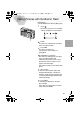
1
Press the [MENU] button.
2
Press
3/4 to select
[QUALITY].
3
Press
2/1
to select the quality (Data
Compression Ratio).
• : Fine (Low compression)
It gives priority to picture quality and
record high quality pictures.
• : Standard
(Standard compression)
It gives priority to the number of
recordable pictures and record
standard quality pictures.
A: Quality and number of
recordable
pictures
(a Picture size, b Quality) (With
the supplied 8MB SD memory card)
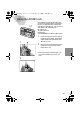
4
Press the [MENU] button.
• The menu will disappear.
• In motion image mode [ ], quality cannot be modified.
• It could happen that picture are like a mosaic depending on the scene
characteristics.
• The number of recordable pictures corresponds to the capacity of the supplied
8MB SD Memory card. (If you mix fine quality and standard quality, the number of
recordable pictures changes)
• Remaining frame which is displayed on the LCD monitor may not correspond with
recorded frames. However, this is not a malfunction.
1,4
2,3
QUALITY
PICT.SIZE
SENSITIVITY
SPOT MODE
MONITOR
2 / 3
100
640
ISO
2,3
KC4-PP.book 35 ページ 2002年1月21日 月曜日 午後7時51分