
Operation Manual




34
Changing the Picture Size
You can choose among 3 kinds of picture
size settings.
[Preparation]
• Set the REC/power switch to [ON]. (P18)
1
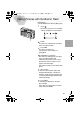
Press the [MENU] button.
2
Press
3/4 to select [PICT. SIZE].
3
Press
2/1
to set the picture size.
• : 1600 x 1200 pixels
• : 800 x 600 pixels
• : 640 x 480 pixels
4
Press the [MENU] button.
• The menu will disappear.
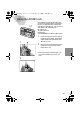
• In motion image mode [ ], it is fixed to 320 x 240 pixels.
• If you set the pictures size to small, the memory card can record more pictures.
Moreover, as the data volume is small, you can easily attach the picture to an
e-mail or use it in a web site.
• If you set the picture size to large, it is possible to print clearer sheets.
1,4
2,3
PICT.SIZE
QUALITY
SENSITIVITY
SPOT MODE
MONITOR
2 / 3
1600
800 640
100
ISO
2,3
KC4-PP.book 34 ページ 2002年1月21日 月曜日 午後7時51分