
Operation Manual




33
Taking Pictures with the Self-timer
When you set the self-timer, the picture is
automatically taken after 10 seconds (or 2
seconds).
[Preparation]
• Set the REC/power switch to [ON]. (P18)
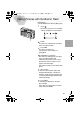
1
Press the [ ] button.
• Every time you press it, what is
displayed changes as shown below.
: Self-timer set to 10 seconds
: Self-timer set to 2 seconds
When these indicators are not
displayed, self-timer setting is
cancelled.
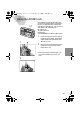
2
Press the shutter button fully.
• The self-timer indicator blinks and the
shutter is activated after 10 seconds
(or 2 seconds).
• Before taking a picture, if you press
the
shutter button fully again
, the
self-timer setting is cancelled.
• In motion image mode [ ], the self-timer is not available.
• In burst mode [ ], the self-timer setting covers only the first picture.
1
2
10 s 2 s
OFF
KC4-PP.book 33 ページ 2002年1月21日 月曜日 午後7時51分