
Operation Manual





16
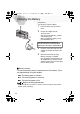
Inserting the Card
[Preparation]
• Set the power switch to [OFF].
1
Slide the lock lever.
2
Open the memory card door.
3
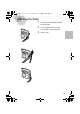
Insert the card all the way in until it
clicks.
• Check the direction of the card.
4
Close the memory card door.
5
Put the lock lever back.
[Removing the card]
1
Press the card.
2
Pull the card out.
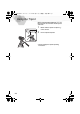
• Do not touch the connection terminal
1
on the back side of the card.
• If the memory card door could not
completely closed, after taking out the
card, insert it again.
• If the card is not inserted, verify whether
the direction of the card is correct.
• We recommend you to use the card
manufactured by this company. (Use only
the genuine card)
• Before removing the card from the
camera, turn the camera off.
1
2,3
4,5
KC4-PP.book 16 ページ 2002年1月21日 月曜日 午後7時51分