
Operation Manual





14
Charging the Battery
[Preparation]
• Set the power
switch to
[OFF].
1
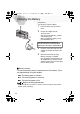
Insert the battery into the camera.
(P13)
2
Plug the AC adaptor into the
electrical outlet.
• The green status indicator
1
blinks
and charging starts.
• During charging the battery, do not
open the battery door.
THE SOCKET OUTLET SHALL BE
INSTALLED NEAR THE EQUIPMENT
AND SHALL BE EASILY ACCESSIBLE.
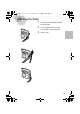
3
Insert the connection plug of the AC
adaptor into the DC IN socket of the
camera.
4
When the status indicator stops
blinking, charging is complete.
• After charging is finished, remove the
AC adaptor from the electrical outlet
and then remove the connecting plug
from the DC IN socket.
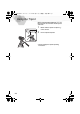
ª Battery indicator
The remaining battery power is displayed on the LCD monitor. (This is
not displayed when using AC adaptor)
: The battery power is sufficient
: The remaining power is a little low
: The remaining power is low
: Replace or recharge the battery
• The status indicator also flashes. In this time, when pressing the shutter button
halfway, alarm sound rings.
2
3
KC4-PP.book 14 ページ 2002年1月21日 月曜日 午後7時51分