
Digital Camera Basic Operating Instructions
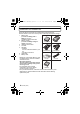
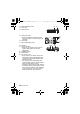
Table Of Contents
- CONTENTS
- Information for Your Safety
- Standard Accessories
- Names of the Components
- Charging the Battery
- About the Built-in Memory/the Card
- Inserting and Removing the Card (optional)/the Battery
- Setting Date/Time (Clock Set)
- Setting the Menu
- Selecting the [REC] Mode
- Taking pictures using the automatic function
- Motion Picture Mode
- Playing back Pictures
- Deleting Pictures
- Reading the Operating Instructions (PDF format)
- Specifications
- Digital Camera Accessory System
- Digital Camera Accessory Order Form
- Limited Warranty (ONLY FOR U.S.A. AND PUERTO RICO)

VQT2R80 (ENG)
8
Standard Accessories
Check that all the accessories are included before using the camera.
Product numbers correct as of January 2010. These may be subject to change.
1 Battery Pack
(Indicated as battery pack or
battery in the text)
Charge the battery before use.
2 Battery Charger
(Indicated as battery charger or
charger in the text)
3 USB Connection Cable
4AV Cable
5 CD-ROM
• Software:
Use it to install the software to your
PC.
• Operating Instructions
6 Hand Strap
7 Battery Case
• SD Memory Card, SDHC Memory Card
and SDXC Memory Card are indicated
as card in the text.
• The card is optional.
You can record or play back pictures
on the built-in memory when you are
not using a card.
• For information about optional
accessories, refer to the
“Digital
Camera Accessory System
”.
• If any accessories are lost, customers should contact Panasonic’s parts
department at 1 800 833-9626 for further information about obtaining
replacement parts.
3
12
56
7
CGA-S/106B
VFC4297
DE-A59B
VU6451023810
4
VU6451024237
VGQ0D56
VFF0621
DMC-F3Basic-VQTXXXX_eng.book 8 ページ 2010年1月7日 木曜日 午後2時46分