
Digital Camera Basic Operating Instructions
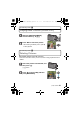
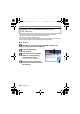


Table Of Contents
- CONTENTS
- Information for Your Safety
- Standard Accessories
- Names of the Components
- Charging the Battery
- About the Built-in Memory/the Card
- Inserting and Removing the Card (optional)/the Battery
- Setting Date/Time (Clock Set)
- Setting the Menu
- Selecting the [REC] Mode
- Taking pictures using the automatic function
- Motion Picture Mode
- Playing back Pictures
- Deleting Pictures
- Reading the Operating Instructions (PDF format)
- Specifications
- Digital Camera Accessory System
- Digital Camera Accessory Order Form
- Limited Warranty (ONLY FOR U.S.A. AND PUERTO RICO)

VQT2R80 (ENG)
22
Others
Reading the Operating Instructions
(PDF format)
• You have practised the basic operations introduced in these operating
instructions and want to progress to advanced operations.
• You want to check the Troubleshooting.
In these kinds of situations refer to Operating Instructions (PDF format) recorded
on the CD-ROM containing the Operating Instructions (supplied).
∫ For Windows
Turn the PC on and insert the CD-ROM containing the
Operating Instructions (supplied).
Click the [Operating
Instructions].
Select the desired language
and then click [Operating
Instructions] to install.
A To return to the install menu.
Double click the “Operating
Instructions” shortcut icon on
the desktop.
DMC-F3Basic-VQTXXXX_eng.book 22 ページ 2009年12月16日 水曜日 午後4時4分