
Digital Camera Basic Operating Instructions


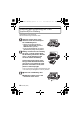

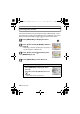

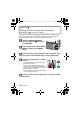
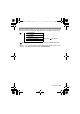
Table Of Contents
- CONTENTS
- Information for Your Safety
- Standard Accessories
- Names of the Components
- Charging the Battery
- About the Built-in Memory/the Card
- Inserting and Removing the Card (optional)/the Battery
- Setting Date/Time (Clock Set)
- Setting the Menu
- Selecting the [REC] Mode
- Taking pictures using the automatic function
- Motion Picture Mode
- Playing back Pictures
- Deleting Pictures
- Reading the Operating Instructions (PDF format)
- Specifications
- Digital Camera Accessory System
- Digital Camera Accessory Order Form
- Limited Warranty (ONLY FOR U.S.A. AND PUERTO RICO)

VQT2R80 (ENG)
12
∫ Charging time
∫ Approximate operating time and number of recordable pictures
Recording conditions by CIPA standard
• CIPA is an abbreviation of [Camera & Imaging Products Association].
• Normal Picture Mode
• Temperature: 23 oC (73.4 oF)/Humidity: 50% when LCD monitor is on.
• Using a Panasonic SD Memory Card (32 MB).
• Starting recording 30 seconds after the camera is turned on.
• Recording once every 30 seconds with full flash every second recording.
• Rotating the zoom lever from Tele to Wide or vice versa in every recording.
• Turning the camera off every 10 recordings and leaving it until the temperature
of the battery decreases.
Connect the charger to the
electrical outlet.
• Charging starts when the [CHARGE]
indicator A lights green.
• Charging is properly complete when
the [CHARGE] indicator A turns off.
Detach the battery after charging is completed.
Supplied battery Optional battery
Charging time Approx. 100 min Approx. 130 min
Supplied battery Optional battery
Capacity of the
battery
740 mAh 940 mAh
Number of recordable
pictures
Approx. 220 pictures Approx. 260 pictures
Recording time Approx. 110 min Approx. 130 min
Playback time Approx. 270 min Approx. 340 min
90
DMC-F3Basic-VQTXXXX_eng.book 12 ページ 2010年1月7日 木曜日 午後2時46分