
User guide




23
RQT8853
Advanced Features
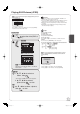
Zoom
While playing a picture
SUB MENU
To zoom in:
Control Panel
Rotate Right
Rotate Left
Zoom In
ENTER
, to select “Zoom
In”, then
ENTER
Notes
To return the picture to its original size
Press [, ] to select “Zoom out” in step 2, then press [ENTER].
When zooming in, the still picture may be cut off.
“Zoom In” information is not stored.
“Zoom In” and “Zoom out” do not work with images that have a
resolution larger than 640480 pixels.
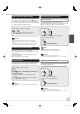
Picture Properties
While playing a picture
STATUS
twice to display picture properties.
11/30 12:03 AM
Date 11/26/2006 002/030
Shooting Date
STATUS
again, to exit.
Notes
Depending on the camera or editing software; shooting dates may
not be displayed correctly.
M5821.indb 23M5821.indb 23 2007/02/26 16:37:562007/02/26 16:37:56