
Operating Instructions




4
AC RC
RESET SET CHECK CLOCK
TIMER
ON SET
OFF CANCEL
132
■ About
Remote Control Preparation
PRODUCT OVERVIEW
• Make sure it is not obstructed.
• Maximum distances: 10m
• Certain fluorescent lights may
interfere signal transmission.
Please consult your nearest dealer.
Remote Control Signal
Action Mode
Press once. Automatic
Press and hold until
you hear one beep,
then release.
Cooling
Press and hold until
you hear one beep,
then release.
Press and hold
until you hear
two beeps, then
release.
Heating
• To turn off, press the AUTO OFF/
ON button again.
Auto OFF/ON Button
6. Press again.
• Timer operation will be based on
current time set.
• The batteries can be used for
approximately 1 year.
3. Close the cover.
4. Press CLOCK.
5. Press to
set time.
Air inlet (rear)
Air outlet
Air inlet (side)
Outdoor Unit
Outdoor Unit
Outdoor Unit
S
FF
CLO
AC RC
RESET SET CHECK CLOCK
TIMER
ON SET
OFF CANCEL
132
Troubleshooting
● In the event of an error, the unit will stop and the timer indicator will blink.
1. Press for 5 seconds.
2. Press until you hear beep
sound, then jot down the
error code.
Notes:
• The unit may be operable (with 4 beeps)
on a limited basis, depending on the error.
F
1
SET
3. Press for 5 seconds to quit
checking.
4. Turn the unit off and reveal the
error code to your nearest dealer.
C
Remote Control
Remote Control
Remote Control
FAN
SPEED
AIR
SWING
AUTO
HEAT
COOL
DRY
ION
OFF
/ON
TEMP
MODE
QUIET
AIR
SWIN
G
TIMER
ON SET
OFF
CANCE
L
AC RC
RESETSET
CHECK CLOCK
INVERT
ER
132
POW
ERF
UL FAN SP
EED
ion
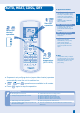
LCD display
Off/On
Fan Speed selection
Clock setting
Ion operation
Powerful Operation
Quiet Operation
Timer setting
Operation mode
Airflow direction
adjustment
Transmitter
Check
Temperature setting
* For normal operation, the and reset buttons are not in use.
* Press reset to restore the remote control’s default setting.
1. Pull out
the cover.
2. Insert AAA or R03
batteries.
Indoor Unit
Indoor Unit
Indoor Unit
Air intake
Airflow direction
louver
Ionizer
Air filter
Front panel
Supersonic air
purifying device
Auto OFF/ON
button
Receiver
Discharged air
Do not touch
during operation
Indicator