
User's Manual Part 3





300
Data Display/Edit/Management
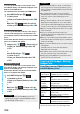
With a microSD memory card inserted, connect the
FOMA phone to a personal computer; then you can
read the data from or write the data onto the microSD
memory card.
The following equipment is required:
p
Connector Cable:
FOMA USB Cable with Charge Function 01 (option)
p
Personal Computer:
Personal computer having the USB port (Universal Serial
Bus Specification Rev 1.1 compliant) that can be
connected with the FOMA USB Cable with Charge
Function 01 (option)
p
Compatible Operating Systems:
Windows 2000, Windows XP, Windows Vista (Japanese
version in each)
1
m
Settings
Other settings
USB mode setting
microSD mode
p
When you set to “microSD mode”, “ ” appears on the
Stand-by display.
p
To save WMA files from your personal computer to the
microSD memory card, set to “MTP mode”. When you set
to “MTP mode”, “ ” appears on the Stand-by display.
p
To use the FOMA phone for packet communication,
64K data communication, data sending/receiving
(OBEX), and for calls with USB Hands-free compatible
device, set mode to “Communication mode”.
2
Connect the FOMA phone to a personal
computer using the FOMA USB Cable with
Charge Function 01 (option).
The personal computer recognizes the microSD memory
card.
p
“ ” appears on the desktop, and “ ” appears on
the Stand-by display. Also, “ ” is displayed while the
microSD memory card is in the FOMA phone.
Use FOMA Phone as microSD Reader/
Writer
Information
p
If the FOMA phone and personal computer are not correctly
connected, or the remaining battery level of the FOMA
phone shows very low or goes flat, you cannot send or
receive data. In addition, you may lose data.
p
While data is being read or written, do not pull the FOMA
USB Cable with Charge Function 01 off. Not only you cannot
send or receive data, but also you may lose the data.
p
While data is being read or written, you cannot set this
function. Further, make sure that you do not “Reset
settings” or “Initialize” during reading/writing. Malfunction of
the microSD memory card could result.
p
You cannot read from/write to a personal computer while
reading from/writing to the FOMA phone, and vice versa.
p
To use the DoCoMo keitai datalink, set it to “Communication
mode”.
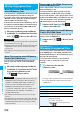
The FOMA phone creates the following folders within
the microSD memory card to save data files. To write
files in the microSD memory card from a personal
computer, you need to write the following configuration
and file names.
DCIM (Folder for DCF standard still images)
△△△
_PANA
P
△△△
zzzz.### (Extension is JPG, or GIF.)
MISC [DPOF folder (This folder is created automatically
when “DPOF Setting” on page 311 is set.)]
SD_VIDEO (Folder for moving images)
PRL
◇◇◇
(Folder for movie)
MOL
◇◇◇
.### (Extension is 3GP, SDV, ASF, or MP4)
MGR_INFO (Folder for video management information)
PRG
◇◇◇
(Folder for video)
PRIVATE
DOCOMO
STILL (Folder for non-DCF standard still images)
SUD
□□□
STILzzzz.### (Extension is JPG, GIF, or SWF.
)
DOCUMENT (Folder for PDF file)
PUD
□□□
PDFDC
□□□
.PDF
RINGER (Folder for melodies)
RUD
□□□
RINGzzzz.### (Extension is MLD, or SMF
)
TORUCA (Folder for ToruCa files)
TRC
□□□
TORUC
□□□
.TRC
MMFILE [Folder for non-SD-VIDEO standard moving
images (include music data of AAC format)]
MUD
□□□
MMFzzzz.### (Extension is 3GP, SDV, ASF, or MP4.
)
WM_SYSTEM
WM
DECOIMG (Folder for Decomail-pictographs)
DUD
□□□
DIMGzzzz.### (Extension is JPG, or GIF.)
OTHER (Folder for SD other files)
OUD
□□□
OTHER
□□□
.### (Extension is up to three-digit
half-pitch alphabets that the FOMA phone cannot
recognize.)
MOVIE (Folder for PC movie files)
MVUD
□□□
MOVIE
□□□
.### (Extension is WMV, WMA,
WVX, WAX, ASF, or ASX.)
TABLE (Folder for additional information)
Folder Configuration on
microSD Memory Card