
User's Manual Part 3





299
Data Display/Edit/Management
When you use the microSD memory card for the first
time, you need to format (initialize) it. Be sure to use
FOMA P905i for formatting. The microSD memory card
formatted using other devices such as personal
computers may not be used properly.
Note that formatting deletes all the contents on the
microSD memory card.
1
m
LifeKit
SD-PIM
i
()
microSD format
Enter your Terminal Security Code
YES
You can check and recover the microSD memory card.
1
m
LifeKit
SD-PIM
i
()
Check microSD
YES
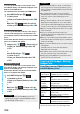
Copy
See page 275.
Move
See page 275.
Delete this
See page 275.
Delete all
See page 276.
Multiple-choice
See page 276.
Memory info
You can display the used memory space
(estimate).
microSD Format
Formatting microSD Memory Card
Function menu
Operation/Explanation
<>
Information
p
Do not remove the microSD memory card during formatting.
Malfunction of the FOMA phone or microSD memory card
could result.
p
If you press
+l
() or
-h,
or receive a voice call or
videophone call while formatting the microSD memory card,
formatting is canceled. Format it again.
p
Files that have been saved to the microSD memory card
whose formatting is suspended becomes unfixed.
p
You cannot format the incompatible memory card.
p
Required folders are automatically created when you save
data to the microSD memory card after formatting.
Check microSD
Checking microSD Memory Card
<>
You can display the used and unused memory space
(estimate) on the microSD memory card.
p
See page 276 for checking the used memory space for the
still images or moving images.
1
m
LifeKit
SD-PIM
i
()
microSD info
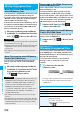
By connecting the microSD memory card to the
microSD memory card adapter, you can use the
microSD memory card on a personal computer which
supports SD memory card.
The microSD memory card adapter is available at mass
retailers for home electric appliances etc.
For installing the microSD memory card adapter, refer
to the instruction manual for the microSD memory card
adapter.
Information
p
Do not remove the microSD memory card during Check
microSD. Malfunction of the FOMA phone or microSD
memory card could result.
p
You cannot execute Check microSD for the unformatted
microSD memory card or incompatible memory card.
p
When you execute Check microSD, the microSD memory
card may not be recovered correctly, the data existed
before executing Check microSD may be deleted, or the
microSD memory card itself may be initialized depending on
the condition of the microSD memory card.
p
If you press
+l
() or
-h,
or receive a voice call or
videophone call during Check microSD, Check microSD is
canceled.
p
If you cancel Check microSD midway, data not recovered
may remain. In this case, try Check microSD again.
p
It may take long to complete Check microSD depending on
the data volume stored on the microSD memory card.
microSD Info
Displaying Capacity of microSD
Memory Card
<>
Information
p
As the microSD memory card contains the system files for
the card, the memory space is smaller than that described
on the microSD memory card even if it contains no data.
Using a microSD Memory Card
with a Personal Computer