
User's Manual Part 3




343
Other Convenient Functions
Two types of Voice Memo are available; one is “Voice
memo” (during a call) for recording the other party’s
voice during a call and the other is “Record voice
memo” for recording your own voice during standby.
You can record either one of “Voice memo” (during a
call) or “Voice memo” for about three minutes.
p
See page 68 for playing back/erasing “Voice memo” (during
a call) or “Voice memo”.
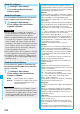
1
During a voice call
>
(for at least one second) or
l
().
A beep sounds and recording starts.
p
To suspend the recording midway, press
Oo
()
or
r,
or press and hold
>
(for at least one second).
p
Press
h
to end the recording and the call.
p
A beep sounds about five seconds before the recording
time (for about three minutes) ends.
The beep sounds twice when the recording ends and
the “Talking” display returns.
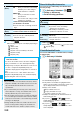
1
m
LifeKit
Rec. msg/voice memo
Voice memo
YES
A beep sounds and recording starts. Speak into the
microphone.
p
To suspend the recording midway, press
Oo
(),
r
or
h
.
p
A beep sounds about five seconds before the recording
time (for about three minutes) ends.
The beep sounds twice when the recording ends and
the former display returns.
Voice Memo during a Call / Voice Memo
Recording Voice during a Call
or Standby as Voice Memo
Record Other Party’s Voice during a Call
<><>
Information
p
If you record a voice memo when either “Voice memo”
(during a call) or “Voice memo” has already been saved, the
old one is overwritten regardless of whether you have
played back or not.
p
You cannot record a voice memo while operating each item
in the Function menu.
+m-5-5
Record Your Voice during Standby
Information
p
The recording is suspended when a call comes in, when an
alarm for “Alarm”, “Schedule”, “ToDo”, “Book program”, or
“Timer recording” sounds, or when you switch the displays
by Multitask.
During a videophone call, you can record the receiving
images along with voice.
You can record up to five items for about 20 seconds
per item.
p
See page 69 for playing back/erasing “Movie memo”.
1
During a videophone call
>
(for at least one second)
A beep sounds and recording starts. “ ” is displayed
during recording.
p
A still image specified by “Movie memo” of “Select
image” is shown on the other party’s display.
p
To suspend the recording midway, press
Oo
()
or press and hold
>
(for at least one second).
p
Press
h
to end the recording and the call.
p
A beep sounds about 5 seconds before the recording
time (for about 20 seconds) ends.
The beep sounds twice when the recording ends and
the “Talking” display returns.
You can confirm the last and accumulated call duration
and cost for voice calls and videophone calls.
p
Displayed call duration and cost are for reference and might
differ from the actual ones. In addition, the consumption tax
is not included in the call cost.
p
Both the voice call duration and digital communications
duration (videophone call duration + 64K data
communication duration) are displayed and both incoming
and outgoing calls are included in the duration.
p
The call cost is for the outgoing calls only. However, “¥0” or
“¥
__
” is displayed for toll free calls such as Free Dial or for
Directory Assistance Service (104), etc.
p
The call cost is accumulated on the UIM. Therefore, when
you replace the UIM, the charge accumulated on the UIM in
use is displayed. (accumulation from December 2004)
※
You cannot display the accumulated cost on the UIM
using the FOMA phones that were released before the
901i series. (The cost is accumulated on the UIM.)
p
You can reset the displayed call duration and call cost.
Movie Memo
Recording Images during a
Videophone Call as a Movie Memo
<>
Information
p
If you record a movie memo when five movie memos have
already been recorded, the oldest movie memo is overwritten
regardless of whether you have played it back or not.
p
You cannot record a movie memo while operating each item
in the Function menu.
+m-6-1
Call Data
Checking Call Duration and Cost
<>
ᵡᶍᶌᶒᶇᶌᶓᶃᶂ