
User's Manual Part 3





298
Data Display/Edit/Management
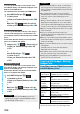
You can move the copyrighted file obtained from a site
to the microSD memory card after encoding. The
moved file is then saved to the destination folder in the
“Movable contents” folder (the specified destination
folder for Chaku-uta Full
®
music files).
Some files you moved to the microSD memory card can
be operated only with the UIM you used when moving,
and some files can be operated with the UIM and the
phone you used when moving.
1
Still image List/Moving image List/Melody
List/Kisekae Tool List/Chaku-uta Full
®
Music
List
i
()
Move to microSD
OK
You can move a copyrighted file from the microSD
memory card to the “i-mode” folder in the FOMA
phone.
1
Still Image List/Moving Image List/Melody
List/Kisekae Tool List/Chaku-uta Full
®
Music
List on the microSD memory card
i
()
Move to phone
Movable Contents
Moving Copyrighted Files
Move Files in the FOMA Phone to the
microSD Memory Card
<>
Information
p
You can move a file to the microSD memory card only when
the acquired source icon is “ ”.
p
Partially saved i-motion movies, Chaku-uta Full
®
music files
and Kisekae Tool files cannot be moved to the microSD
memory card.
p
The setting is released if you move a file set for another
function.
Move Files from the microSD Memory
Card to the FOMA Phone
Information
p
You can move a copyrighted file (with file restriction) to the
FOMA phone only if its property for “Moved to phone” is
“Available” or “Available (Same model)”. In addition, you
cannot move a file of “Available (Same model)” to the
FOMA phone other than P905i. See “Picture info”,
“
i
motion info”, “Melody info”, “File info”, or “Music info” to
check whether the file is “Available”, “Unavailable” or
“Available (Same model)”.
p
The setting is released if you move a file set for another
function.
p
The moved files are saved to the “i-mode” folder. However,
the Kisekae Tool files are saved to the “Kisekae Tool” folder
and Chaku-uta Full
®
music files are saved to the “Initial
folder” in Data Box.
Some i-
α
ppli programs can be moved to and saved to
the microSD memory card.
You cannot start the i-
α
ppli program moved to the
microSD memory card. Move it back to your FOMA
phone to start. However, some i-
α
ppli programs can be
operated only with the UIM you used when moving, and
some other programs can be operated only with the
UIM and the phone you used when moving.
1
Software List/IC Card List
i
()
Move to microSD
YES
You can move an i-
α
ppli program from the microSD
memory card to the FOMA phone.
1
Software List
i
()
Move to phone
YES
You can save a variety of files which are not supported
by the FOMA phone, or files in BMP and PNG format
obtained by Full Browser, to the microSD memory card.
(See page 185 and page 262)
You can attach the saved files to an i-mode mail
message to send, or check them on a personal
computer.
1
m
Data box
SD other files
Select a folder.
p
See page 302 for the Function menu on the Folder List.
p
You cannot display the contents of the file using the
FOMA phone.
Move i-
α
ppli in the FOMA Phone to the
microSD Memory Card
Move i-
α
ppli from the microSD Memory
Card to the FOMA Phone
SD Other Files
Managing Unsupported Files
<>
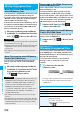
Folder List SD Other File List
Function Menu of the SD Other File List
Function menu
Operation/Explanation
Edit title
See page 274.
File info
You can display the name and type of files.
Attach to mail
You can compose an i-mode mail message
with the file attached.
Go to step 2 on page 172.
p
You can compose it also by pressing
l
().