
User's Manual Part 3




342
Other Convenient Functions
In addition to the phone number (own number) you
have signed up, you can store your personal
information such as your name, reading of your name,
phone numbers (up to three), mail addresses (up to
three), a postal address, a birthday, memorandums,
and a still image.
If you change the mail address or register a secret
code, change the mail address in this function as well.
1
m
Phonebook
Own number
l
()
Enter your Terminal Security Code.
Perform the operation in step 2 on page 84 to store
personal information.
p
You cannot change or delete own number.
p
If you have already entered your Terminal Security
Code by operating another function such as “Display all
data”, the display for entering your Terminal Security
Code does not appear.
2
Press
l
().
Add desktop
icon
See page 114.
Reset menu
You can reset the Private menu to the default.
YES
Release this
YES
Release all
YES
Information
<Add to menu>
p
For “i-mode”, “
i
α
ppli”, and “Mail”, you can store only the
main menu items of the menu function. Functions in the
main menu items cannot be stored.
<Change BG image>
p
The image you can set is a JPEG or GIF image whose size
is Stand-by display (480 x 854) or smaller and up to 300
Kbytes. Perform “Change size” or “Trim away” for other
images to set. However, when you set a GIF animation, the
first frame is displayed.
+m-0
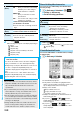
Own Number
Storing Your Name, Mail
Address and Other Information
Function menu
Operation/Explanation
<>
Own Number display
Information
p
The items other than own number are displayed even if you
use another UIM, because they are stored in the FOMA
phone.
p
The mail address you can change using this function is
limited to the mail address displayed by “Own number”. You
cannot change the actual mail address.
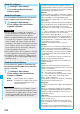
Function Menu of the Own Number Display
Function menu
Operation/Explanation
Edit
Go to step 1 on page 342.
Character size
See page 92.
Display all
data
You can display all the stored phone numbers
and mail addresses.
Enter your Terminal Security Code.
Use
No
to display each item.
Copy name
You can copy a name.
Copy phone
number/
Copy mail add./
Copy address/
Copy birthday/
Copy
memorandums
You can copy each item.
p
The items in the Function menu differ
depending on the displayed item.
Send Ir data
See page 305.
p
You can send data via infrared data
exchange also by pressing
c
().
transmission
See page 306.
p
You can send data via iC transmission also
by pressing
m
().
Copy to
microSD
See page 295.
Erase phone
number/
Erase mail
add./
Erase address/
Erase birthday/
Erase
memorandums/
Delete image
You can delete each item.
YES
p
When the display for entering your Terminal
Security Code appears, enter the code.
p
The items in the Function menu differ
depending on the displayed item.
Reset
You can reset (delete) all the stored personal
data such as phone numbers or mail
addresses except own number.
YES
p
When the display for entering your Terminal
Security Code appears, enter the code.
Auto acquire
No. B
You can check if the 2in1 service is
contracted. When it has been contracted,
Number B is stored.