
User's Manual Part 3




341
Other Convenient Functions
You can set whether to make an alarm notification of
“Alarm”, “Schedule”, “ToDo” and “Book program”, for
when operating another function.
1
m
Settings
Clock
Alarm setting
Operation preferred or Alarm preferred
Operation preferred
. . . Alerts you only during the Stand-by display.
Alarm preferred
. . . Alerts you even when you are operating the FOMA
phone or during a call.
Category
display
Select a category.
p
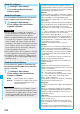
Select a ToDo item to display the details of
it.
Sort/Filter
You can sort ToDo items for display. You can
also list them up by the specified status.
Select the order or state you want to
display.
Add desktop
icon
See page 114.
Attach to mail
You can attach the ToDo item to i-mode mail
to send.
Go to step 2 on page 172.
p
You can attach it to i-mode mail also by
pressing
l
( ) while checking the
stored contents of the ToDo item.
Send Ir data
See page 305.
Send all Ir data
See page 305.
transmission
See page 306.
All
transmission
See page 307.
Copy to
microSD
See page 295.
Delete this
YES
Delete select
Put a check mark for ToDo items to be
deleted
l
()
YES
Delete
completed
You can delete the “Completion” ToDo items.
YES
Delete all
Enter your Terminal Security Code
YES
Information
p
During standby, the alarm tone sounds at the level set for
“Phone” of “Ring volume”. During a call, the alarm tone
sounds at the level set for “Volume” (earpiece volume).
Alarm Setting
Setting Operating Conditions of
Alarm
Function menu
Operation/Explanation
<>
Information
p
When you could not be alerted, the “Missed alarm” icon
appears on the desktop.
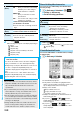
You can store frequently used functions in the Private
menu.
You can store a total of 12 items from respective
functions in Main Menu (see page 394).
1
mm
()
Private menu is displayed.
p
Press
i
( ) to display
the Private Menu List.
p
If you have not touched any keys
for at least 15 seconds, the
Stand-by display returns.
2
Select an icon.
The display for the selected function is displayed.
1
m
Settings
Display
Private menu setting
Private Menu Setting
Using Your Original Menu
Select a Function from the Private Menu
<>
Private menu
+m-5-2
Display the Private Menu List
Private Menu List
Function Menu of the Private Menu List
Function menu
Operation/Explanation
Add to menu
You can store the frequently used function in
the Private menu.
Select a function to be stored.
p
Press
No
to display the storable functions
by main menu item or sub-menu item. Press
Bo
to highlight the function you store.
Change BG
image
Select a folder
Select an image.
ᵡᶍᶌᶒᶇᶌᶓᶃᶂ