
User's Manual Part 3




338
Other Convenient Functions
2
Press
l
().
p
The following icons appear on the display depending on
the setting:
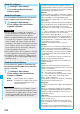
: Alarm sounds.
: Repeats daily.
: Repeats on the specified day of the week.
: Repeats monthly.
: Repeats yearly.
(Alarm)
Select an alarm method.
ON
. . . . Alerts you at the time of the starting
date/time you set. The setting for
alarm notification is completed.
ON/Set time
. . . . . . . Alerts you at the time set as the
prenotification.
OFF
. . . Does not alert. The setting for alarm
notification is completed.
Enter how many minutes before the
specified time to be alerted.
p
You can enter from “01” through “99” in two
digits.
(Alarm)
Select a type of alarm tone
Select a folder
Select an alarm tone.
(Contents)
Enter schedule contents.
p
You can enter up to 256 full-pitch/512
half-pitch characters.
Item Operation/Explanation
■
When you attempt to set two schedule events to the
same date and time
You can set the schedule events to the same setting time
only by a combination of “1 time” and “Daily/Select day/
Monthly/Yearly” for “Repeat”. When both two events are set
to “1 time” or “Daily/Select day/Monthly/Yearly”, the
confirmation display appears asking whether to overwrite on
each.
When one event is set to “1 time” and the other is set to
“Daily/Select day/Monthly/Yearly”, the confirmation display
appears telling that “1 time” has priority.
Information
p
If you enter a date on or after 29th in “Date (from)” and set
“Repeat” to “Monthly”, the schedule event is set on the last
day of the month when the month does not have the
specified date.
p
If you enter February 29 of the leap year in “Date (from)”
and set “Repeat” to “Yearly”, the schedule event is set on
February 28 when the year is not the leap year.
p
For the schedule event stored as secret data, an animation
for secret data appears when the alarm sounds in ordinary
mode (not in “Secret mode” or “Secret data only”). An alarm
message is not displayed.
p
During standby, the alarm tone sounds at the level set for
“Phone” of “Ring volume”. During a call, the alarm tone
sounds at the level set for “Volume” (earpiece volume).
You can store up to 100 holidays and anniversaries;
one each per day.
1
m
Stationery
Schedule
l
()
Holiday or Anniversary
Do the following operations.
2
Press
l
().
p
The holiday ( ) or anniversary ( ) you set is stored.
: Repeats yearly.
You can check the details of schedule events, holidays,
or anniversaries.
1
m
Stationery
Schedule
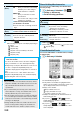
The Calendar display appears.
p
Today and the selected date are highlighted and the
number of stored schedule events and the contents of the
day are displayed at the bottom of the display.
p
Display on the calendar
(blue): Schedule set for a.m.
(orange): Schedule set for p.m.
_
: Schedule continues two days or more
p
Holidays are displayed in red, and anniversaries are
marked with a red circle.
p
If you press
m
( ) or
c
( ) from the
monthly display, the calendar for the pervious or next
month is displayed.
p
If you press
m
( ) or
c
( ) from the
weekly display, the calendar for the pervious or next
week is displayed.
Store Holidays/Anniversaries
Item Operation/Explanation
(Date setting)
Enter the date.
(Repeat)
Select a type of repeat.
p
If you select “1 time”, the holiday/
anniversary is not repeated.
p
The holiday or anniversary set with
repetition is counted as one event.
(Edit holiday)
(Edit
anniversary)
Enter the contents of the holiday or
anniversary.
p
You can enter up to 10 full-pitch/20
half-pitch characters.
Check Schedule Events
Calendar display
(Monthly display)
Calendar display
(Weekly display)