
User's Manual Part 3





297
Data Display/Edit/Management
1
Still Image List/Still image in play/Moving
Image List/Melody List/Melody during
playback/PDF File List
i
()
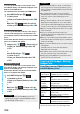
Copy to microSD
p
When you have selected “Multiple-choice” to select the
files to be copied, you can copy multiple files at a time.
You can copy files from the microSD memory card to
the i-mode folder in the FOMA phone.
(Decomail-pictographs are copied to the “
お気に入り
(Favorite)” folder in the “Decomail-pictograph” folder.)
1
Still Image List/Still image in play/Moving
Image List/Moving image in pause/Moving
image at the end of playback/Melody List/
Melody during playback/PDF File List, which
is on the microSD memory card
i
()
Copy to phone
p
When you have selected “Multiple-choice” to select the
files to be copied, you can copy multiple files at a time.
p
See page 162 when images/i-motion movies/Melodies/
PDF files are stored to the maximum.
Information
p
You can copy JPEG, GIF, SWF, MP4, MFi, SMF and PDF
files in the “i-mode” folder, “Camera” folder,
“Decomail-picture” folder, “Decomail-pictograph” folder and
a user folder.
p
You can copy multiple JPEG, GIF, SWF and MP4 files at a
time but not others.
p
When the files in the destination folder are stored to the
maximum, a new folder is automatically created and files
are saved to that folder.
For the files other than still images, the message “Storage is
changed to XXXXXXX” (XXXXXXX denotes a folder name)
appears when copying is completed.
p
You cannot copy the following files:
・
Files that you shot Chara-den models whose “Rec. file
restriction” is “File restricted”
・
Files whose output from the FOMA phone is prohibited
・
Pre-installed Decomail-pictures
・
Files set with playback restrictions
・
Partially saved i-motion movies or Chaku-uta Full
®
music
files
PDF files partially downloaded page by page
p
If you copy the file to the microSD memory card, the image
quality may deteriorate or the file size becomes larger.
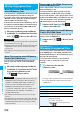
Copy Files from the microSD Memory
Card to the FOMA Phone
Information
p
Do not pull out the microSD memory card during copying.
p
You can copy JPEG, GIF, SWF, MP4, MFi, SMF and PDF
files. However, you cannot copy a melody and a SWF file in
excess of 100 Kbytes.
p
You can copy multiple JPEG, GIF, SWF and MP4 files only
at a time. However, you cannot copy multiple moving
images of ASF format, VGA (640 x 480) and HVGA Wide
(640 x 352) size, or in excess of 10 Mbytes.
p
When you copy moving images, the images are cut out,
converted or shrunk; therefore the image quality may
deteriorate or the file size may become larger or smaller.
However, a moving image whose video codec is H.264 is
copied without being converted or shrunk.
p
When you copy VGA (640 x 480) size or HVGA Wide (640 x
352) size of a moving image, the image is converted into
QVGA (320 x 240) size. When you copy VGA (640 x 480)
size or HVGA Wide (640 x 352) size of a moving image,
ASF file, or the file in excess of 10 Mbytes, it might take a
longer time.
p
You cannot copy the moving image in excess of 10 Mbytes
in the following cases:
・
When the video codec is H.264
・
When the audio codec is AAC, AAC+ (HE-AAC), or
Enhanced aacPlus
・
When the bit rate of the moving image is in excess of the
restriction
・
When searching (fast forward or fast rewind) is disabled
・
When the moving image size is other than VGA (640 x
480), HVGA Wide (640 x 352), QVGA (320 x 240),
QCIF (176 x 144) or Sub-QCIF (128 x 96)
Some moving images cannot be copied in the conditions
other than the above.
p
Playing back a copied ASF file may take a longer time.
p
The file after copying takes the title of the one set on the
microSD memory card. When no title is set on the microSD
memory card or the default title is unknown, the file name
will be the title.
Information