
User's Manual Part 3





320
Music&Video Channel/Music Playback
Delete/Delete
this
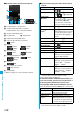
You can delete the program.
YES
p
When you delete the currently distributed
program, “Setting program” is displayed
until the next program distribution.
“No program” is displayed when no program
is set.
Delete all
You can delete all the programs stored in the
“Saved program” folder.
Enter your Terminal Security Code
YES
Information
<Play mode setting>
p
Even if you set to “Repeat”, the playback is not repeated if
the program has restrictions on the number of playbacks.
p
Even if you set to “Normal”, the playback may repeated it
depending on the program if the program has time zone
restrictions.
<Move program>
p
You cannot move the program when its obtaining is not
completed, or the move restriction or time zone restriction is
set for the program.
<Edit title>
p
When the next program is delivered, the edited title is
overwritten by the new title.
<Multiple-choice> <Delete/Delete this> <Delete all>
p
Even when you delete the program, the program setting is
not released.
Function Menu during Playback/Pause
Function menu
Operation/Explanation
Function menu
Operation/Explanation
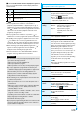
Chapter list
See page 319.
Play mode
setting
See page 319.
Sound effect
(Remaster)
You can bring the sound from an earphone or
Bluetooth device to the original sound by
complementing high-pitch range lost at data
compression.
Remaster
ON or OFF
Sound effect
(Listening)
You can set sound effect for listening.
Listening
Select an item.
Surround
. . . Makes the sound natural and
stereophonic.
Natur 1/2
. . . Complements the cooped-up
feeling specific to earphones and
plays back natural sound. Select
1 or 2 according to your taste.
OFF
. . . . . . . Sets Listening to “OFF”.
p
“Natur 1/2” is effective for the sound from an
earphone or Bluetooth device.
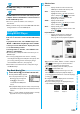
You can play back music files on your FOMA phone by
using MUSIC Player or i-motion player.
■
MUSIC Player (See page 323)
By “MUSIC Player” of “MUSIC”, you can play back Chaku-uta
Full
®
music files or music files saved from music CDs to the
microSD memory card via a personal computer.
■
i-motion Player (See page 280)
From the “
i
motion” folder in “Data box”, you can play back
the voice-only i-motion movie (including music data of AAC
format) or AAC format files stored on the microSD memory
card.
p
You can use mail functions, display sites, and so on, while
listening to music using MUSIC Player (Play Background).
(See page 419
)
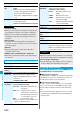
Sound effect
(Equalizer)
You can change the quality of sound from an
earphone or Bluetooth device.
Equalizer
Select an item.
Normal
. . . . .Reproduces normal sound
quality.
S-XBS1
. . . .Enhances bass sound.
S-XBS2
. . . .Enhances bass sound more
deeply than S-XBS1.
Train
. . . . . . . Minimizes abnormal sound that
causes sound leakage.
Program info
See page 319.
Chapter info
You can display the title, play time, etc. of the
chapter currently played back.
Connect to
URL
See page 319.
Previous
image
You can display a previous image.
Next image
You can display a next image.
Change to full
The image is played back in the horizontal
screen by rotating it 90 degrees to the right.
p
When it is already played horizontally, the
vertical display returns.
Information
<Sound effect>
p
Even if an earphone or Bluetooth device is not connected,
the respective setting contents are displayed on the display.
<Previous image> <Next image>
p
You can display up to three images, however, you may not
be able to display them depending on the program.
Playing Back Music
Function menu
Operation/Explanation