
User's Manual Part 3





316
Music&Video Channel/Music Playback
Music&Video Channel is a service which automatically
delivers up to about one-hour programs at night by just
setting your favorite music programs in advance.
Further, you can enjoy high-quality moving image
program of up to about 30 minutes. Programs are
updated periodically and you can enjoy the delivered
programs at your convenient time such as on
commuting.
■
Before using Music&Video Channel
p
Music&Video Channel is a pay service which is available on
a subscription basis. (You need to subscribe to i-mode and
Pake-Houdai/Pake-Houdai Full to apply for it.)
p
Other than the service fee for using Music&Video Channel,
you might be separately charged an information fee
depending on the program.
p
For the details on Music&Video Channel, refer to “Mobile
Phone User's Guide [i-mode]”.
p
If you insert the UIM to the Music&Video Channel
incompatible FOMA phone after you subscribe to
Music&Video Channel, you cannot use Music&Video
Channel Service. Note that the service fee applies unless
you cancel the Music&Video Channel subscription.
p
You cannot obtain or set programs during international
roaming, as Pake-Houdai/Pake-Houdai Full is not applied.
When you try to obtain or set programs, note that you are
charged a packet communication fee for the i-mode
communication. Take procedures to halt the distribution of
programs before departure to overseas. Then, after
homecoming, resume receiving distribution.
If you previously set a program that you want to watch,
the FOMA phone automatically downloads the program
data at night.
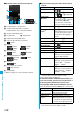
1
m
MUSIC
Music&Video Channel
2
Set program
Follow the instructions on the
display to set a program.
For details, refer to “Mobile Phone User’s Guide [i-mode]”.
p
See page 162 when data files are stored to the
maximum.
What is Music&Video Channel?
Setting Programs
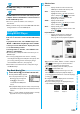
Music&Video Channel
display
■
When a program is set
“ ” appears on the Stand-by
display 12 hours before the time the
program obtaining starts. However, it
does not appear if you have inserted
a UIM which is different from the one you used to set the
program.
Programs are automatically obtained
at night. The display for obtaining
programs does not appear but “ ”
appears on the desktop when they
are successfully obtained.
Press
Oo
, highlight “ ”, and press
Oo
() to
display the Music&Video Channel display. When obtaining
fails, “ ” appears.
Information
p
When the communication is disconnected during obtaining
a program, re-obtaining is automatically tried up to five
times by an interval of about three minutes. When a display
for obtaining a program is shown, however, the confirmation
display appears asking whether to re-obtain the program.
p
The ring tone does not sound and the vibrator does not
work to notify that obtaining programs starts or is
completed. When you set “Music&Video ch illum.” of
“Illumination” to “ON”, the Call/Charging indicator flickers
when obtaining programs is completed. (See page 111)
p
You can set up to two programs at once.
p
Note that a newly obtained program overwrites a saved
program and you can no longer play back that saved
program afterward. To avoid overwriting, perform “Move
program” to move the program to the “Saved program”
folder.
p
You cannot save the obtained program to the microSD
memory card.
p
To set programs, you need to register the site which offers
Music&Video Channel programs to your My Menu. (See
page 156)
p
If you have not subscribed to Music&Video Channel, select
“About this service” to see the Music&Video Channel
introduction page.
p
When the programs could not be obtained due to “power
off” or “low battery” at the start time of program obtaining,
re-obtaining is performed at night of the following day.
p
It may take a time to obtain programs, so fully charge the
battery and operate in the good radio wave conditions.
p
You cannot perform the setting operation and automatic
obtaining of the program selected on the Music&Video
Channel display or the program in use.
p
When you cancel Music&Video Channel, the programs
other than those moved by “Move program” are deleted.
p
If you insert a UIM which is different from the one you used
to set programs, programs cannot be automatically
obtained. Set the programs again from the Music&Video
Channel display.