
User's Manual Part 3





295
Data Display/Edit/Management
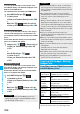
You can copy the Phonebook entries, schedule events,
ToDo items, mail messages, text memos, and
bookmarks stored in the FOMA phone to the microSD
memory card.
You can copy a single file from the FOMA phone onto
the microSD memory card. A copied data item is saved
as a single file.
You cannot copy the secret code stored in a
Phonebook entry.
1
Display for a data item to be copied
i
()
Copy to microSD
YES
You can copy the data items of the category selected
on the Category List or of the category displayed on the
microSD File display from the FOMA phone to the
microSD memory card. The copied data items are all
saved as a single file.
You cannot copy secret codes or voice dial entries
stored in the Phonebook entries.
1
Category List/microSD File display
i
()
Copy to microSD
Enter your Terminal Security Code
YES
p
To copy scheduled events, select “Schedule”, “ToDo”,
or “All” (Schedule and ToDo).
p
To copy bookmarks, select “i-mode”, “Full Browser”, or
“All” (i-mode and Full Browser).
Delete this
YES
Delete all
You can delete all files in the currently
displayed category.
Enter your Terminal Security Code
YES
microSD info
See page 299.
Property
You can display the detailed data display.
microSD
format
See page 299.
Check
microSD
See page 299.
Information
<Delete this> <Delete all>
p
When the access right is set for read only by devices such
as a personal computer, the confirmation display appears
asking whether to delete the data.
Copy Data Items in the FOMA Phone to
the microSD Memory Card
Copy one to microSD
Function menu
Operation/Explanation
Copy all to microSD
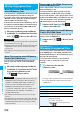
You can copy the Phonebook entries, schedule events,
ToDo items, mail messages, text memos, and
bookmarks (i-mode/Full Browser) stored on the
microSD memory card to the FOMA phone.
p
See page 301 for the number of data items that can be
saved to the microSD memory card.
You can copy the data item selected on the Data List or
displayed on the detailed Data display to the FOMA
phone.
1
Data List/Detailed Data display
i
()
Add one to phone or Copy to phone
YES
You can copy all data items in all files of the category
selected on the Category List or all data items in all
files displayed on the microSD File display to the FOMA
phone.
The copied data items are added to the FOMA phone.
1
Category List
i
()
Add all to phone
Enter your Terminal Security Code
YES
or
microSD File display
i
()
Add all to phone
Enter your Terminal Security Code
YES
Information
p
When you copy a file stored as secret data, the file is copied
as an ordinary file.
p
When you copy all files, the files stored as secret data are
also copied.
p
When you copy all the Phonebook entries, the information
from the PushTalk Phonebook entry and the contents of
“Own number” are also copied.
p
For copying mail, some files attached to mail may be
deleted depending on file format.
p
When you copy mail containing links to start an i-
α
ppli
program, the information about starting the i-
α
ppli program
in that mail is deleted.
p
During copying, the FOMA phone is placed in the same
status as it is out of the service area.
Copy Data Items on the microSD
Memory Card to the FOMA Phone
Add one to phone
Add all to phone