
User's Manual Part 3




312
Data Display/Edit/Management
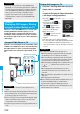
When you connect the FOMA phone to a TV using the
Flat-plug AV Output Cable P01 (option), you can
display still images, moving images/i-motion movies,
and images during a videophone call, video from One
Seg and from i-
α
ppli on the TV. You cannot display any
other images.
Open the cover of the Earphone microphone/AV output
terminal on the FOMA phone and connect the Flat-plug
AV Output Cable to it. Then connect the Flat-plug AV
Output Cable to the video/audio input terminal on the
TV.
p
Still images shot by P905i also support PRINT Image
Matching
Ⅲ
. You can accurately reproduce the conditions at
shooting and your intention when you print the still image
out from a PRINT Image Matching compatible printer, or
when you process it by using a compatible software
program. Some functions are not reproduced by the
compatible printer of earlier version than PRINT Image
Matching
Ⅲ
.
AV Output
Displaying Still Images, Moving
Images/i-motion Movies on TV
Connect FOMA Phone to TV
Information
<>
Information
p
You can connect to the devices other than TV sets for
output.
p
When connecting the Flat-plug AV Output Cable, make sure
that you firmly insert it. Do not pull the cable forcibly, twist it
by the plug, or apply an excessive force.
p
Before connecting or disconnecting the Flat-plug AV Output
Cable to and from the device such as a TV, turn off the
sound volume of the connected device.
p
To pull the plug out, take hold of the plug and then pull it out
softly.
Video
(yellow)
Audio L
(white)
Audio R
(red)
(yellow) (white) (red)
Video/Audio input terminal
Earphone microphone/AV output terminal
Flat-plug AV
Output Cable
1
Play back a still image while the Flat-plug AV
Output Cable is connected
or
connect the Flat-plug AV Output Cable while
a still image is being played back.
p
Press
m
( ) to switch the
display size.
p
You can press
Oo
() to
start a slide show. You can press
Oo
( ) again to stop it.
p
You can press
No
to display a
previous or next still image.
p
Each time you press
l
( ), you can rotate the
still image clockwise by 90
degrees.
p
See page 274 for how to display still images.
p
To cancel AV output, pull the Flat-plug AV Output Cable
off of the FOMA phone. When the playback ends, or
when another function starts up, AV output is canceled
as well.
Display Still Images on TV
Information
p
AV output is not available in the following cases:
・
When the still image is played back from any other than
the Still Image List or icon pasted to the desktop
・
When the still image is played back from any other than
the “i-mode” folder, “Camera” folder, user folders, “Picture”
folder (microSD), and “Image Box” folder (microSD)
・
When displaying a still image whose acquired source icon
is “ ” or “ ”, and whose “File restriction” is “File
restricted”
・
When playing back a Chara-den picture you shot a
Chara-den model whose “Rec. file restriction” is “File
restricted”
・
While the still image is played back in an actual size or by
slide show
・
While playing back a Flash image.
p
When a still image is larger than the VGA (640 x 480) size, it
is reduced to VGA (640 x 480) or smaller with its
proportional ratio retained for displaying on the TV.
p
On some TVs, still images may not be displayed correctly
when the display size is switched.