
User's Manual Part 3






427
Appendix/External Devices/Troubleshooting
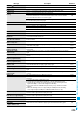
Not notify phone No.
Cannot operate
You could not start up because the other party’s phone number was not notified.
–
Not registered
An error occurred, so you could not store. –
Not secret data
Cannot call
You have switched to Secret Data Only, so you cannot access.
Release Secret Data Only and try again.
P.126
Notification failed
You failed to notify the current location because you moved out the service area during
the notification or by other reasons. Move to a place where the radio waves are strong
enough and try again.
–
Operation canceled
A mail message or Message R/F was received while the selected Messages R/F were
deleted, so operation was suspended.
–
Operation failed
An error occurred, so you could not set. –
Operation may not be performed
The microSD memory card is removed while it is in progress or an error occurred, so it
might be possible that no operation is done. Check “Movie” folder for the data.
P.280
Other function active
Cannot operate
The function is not available simultaneously in Multitask. End the functions not in use
and try again.
P.333
Out of service
Radio waves are not received. Move to a place where the radio waves are strong
enough and try again.
–
Out of service area
Page is not found (404)
The site or Internet web page does not exist, or URL is wrong. Check the URL and try
again.
P.156
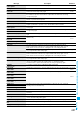
PIN1 code blocked
Three times erroneous entry of the PIN1 code blocks the code. Enter the PUK (PIN
unblock code).
P.119
PIN1 code blocked
Enter PUK
PIN1 code not recognized
Please set “To type” receiver
No address is in the “To” field. Fill in the “To” field and try again. P.172, P.173
Please wait
The audio line/packet communication facility has trouble or the audio line network/
packet communication network is very congested. Wait a while and try again. You can
make calls at 110/119/118. However, calls might not be connected by the situation.
–
The packet communication facility has trouble or the packet communication network is
very congested. Wait a while and try again.
–
Please wait for a while
The audio line/packet communication facility has trouble or the audio line network/
packet communication network is very congested. Wait a while and try again. You can
make calls at 110/119/118. However, calls might not be connected by the situation.
–
Please wait for a while (packet)
The packet communication facility has trouble or the packet communication network is
very congested. Wait a while and try again.
–
Positioning failed
An error occurred because the FOMA phone is out of the service area or by other
reasons, so it failed to measure the current location or to provide the location
information. Move to a place where radio waves are strong enough and try again.
–
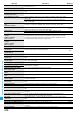
Preparing
Cannot record
You cannot record just after recording. Wait a while and try again.
–
Protected all
Cannot delete
All data items are protected, so cannot be deleted. Release the protection and try again. P.159, P.192,
P.201
Protected
Cannot delete
Protected data, so could not be deleted. Release protection and try again.
P.201
Protected mail
Cannot delete
Protected memo
Cannot delete
Protected message
Cannot delete
PUK blocked
Ten times erroneous entry of the PUK (PIN unblock code) blocks the code. Contact the
handling counter of a DoCoMo shop.
–
PUK code blocked
PUK code not recognized
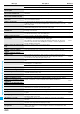
Read error
An error occurred while reading information from the microSD memory card. –
Received invalid data
Received data has an error, so it cannot be displayed or saved. The received data is
discarded.
–
Receiver cannot save data
The receiving end blocks data. –
Receiving failed
The destination address set by Host Selection is wrong, so you cannot select and
receive. Check the setting and try again.
P.165
Registration is in progress (554)
You cannot operate because the user is being registered. Wait a while and try again. –
Replace with a new one or check the
disk
The microSD memory card formatting is abnormal. Execute Check microSD.
P.299
Replay period has not yet started
Playable date has not come yet, so you cannot play back the file. –
Message Description Reference
ᵡᶍᶌᶒᶇᶌᶓᶃᶂ