
User's Manual Part 3




306
Data Display/Edit/Management
1
m
LifeKit
Receive Ir data
p
You can paste the Ir data receiving function to the
desktop. (See page 114)
2
Receive all
Enter your Terminal Security
Code
Enter the same session number as
that entered at the sending end
YES
YES
The stored data is deleted, then receiving starts.
You can use the FOMA phone as a TV remote-controller
by starting the i-
α
ppli program.
p
To use remote-control devices, you may need to download
the software program for those devices. [The pre-installed “G
ガイド
番組表
リモコン
(G Guide Program List Remote-controller)”
supports the infrared remote-controller function.] The key
operation for the remote-controller differs depending on the
software program.
p
This function does not work with some devices.
p
Communication might be affected by compatible devices and
the ambient light.
p
You cannot use the infrared remote-controller during Self Mode.
p
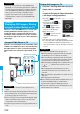
Turn the FOMA phone’s Infrared
data port to the front of a device
to be operated. You can operate
within about 4 meters away from
the device.
p
The radiation angle of the
infrared rays is within
±
15° from
the center.
For when you forward Phonebook entries using
infrared rays, iC communication, SD-PIM, or DoCoMo
keitai datalink, you can specify whether to forward the
stored still images together.
1
m
Phonebook
Phonebook settings
Forwarding image
ON or OFF
+m-7-9
Receive All Data Files
Information
p
When you receive Phonebook entries in which still images
are stored or mail to which files are attached, and the
multiple same still images or files are found, only one image
or file is stored.
Using Infrared
Remote-controller Function
Infrared Remote-controller
+m-2-6
Forwarding Image
Communication Setting
Within about
4 meters
Infrared
data port
Within
±
15°
from the center
<>
iC communication is the function that enables you to
send/receive data files to/from another FOMA phone
using the FeliCa reader/writer function.
You can send/receive data files by overlapping the FeliCa
“ ” mark of your FOMA phone with that of another
FOMA phone supporting the iC communication function.
p
The type of files and conditions of forwarding are the same
as those of infrared data exchange. (See page 303)
However, you cannot send multiple files at a time.
p
You cannot execute iC communication while “IC card lock” is activated.
p
You might have difficulty in sending or receiving files
depending on the destination FOMA phone. In that case,
move a FeliCa mark “ ” close to or away from the other
FeliCa mark or move each side up, down, left, or right.
You can send/receive the data files one by one using iC
communication.
p
See “
■
Notes on sending/receiving” on page 305 as well.
p
You cannot use this function during charging.
1
Display of the data to be sent
i
()
transmission
p
To send a Phonebook entry, select “ transmission”
from the Function menu and select “Send phonebook”.
p
To send a mail message, ToruCa file or bookmark,
select “Ir/ transmission” from the Function menu
and select “ transmission”.
2
YES
1
Overlap the FeliCa mark “ ” at the
sending end with that of your FOMA phone
while the Stand-by display is shown
YES
p
When you receive a Phonebook entry, the confirmation
display appears asking whether to store it also in the
PushTalk Phonebook.
iC Transmission
About iC Communication
<>
Sending/Receiving One Data File
Send One Data File
Overlap one another’s
FeliCa mark “ ”.
Receive One Data File