
User's Manual Part 3





303
Data Display/Edit/Management
The FOMA phone conforms to IrMC version 1.1.
You can exchange data files with the devices
supporting the infrared data exchange function.
However, you cannot exchange some files depending
on the other party’s device.
p
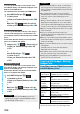
The distance for infrared data exchange should be within
about 20 cm. Do not move the FOMA phone with the infrared
data port pointed to the receiving end until data transfer
ends.
p
Hold the FOMA phone with your hands securely so that it
does not move.
p
If you expose the FOMA phone to direct sunlight or put it under
fluorescent lights or near an infrared equipment, you may not
be able to transmit infrared ray normally due to their influence.
p
First set at the receiving end and begin sending data from
the sending end within 30 seconds.
p
During exchange, the FOMA phone is placed in the same
state as it is out of the service area, so you cannot make/
receive voice calls, videophone calls or PushTalk calls, use
packet communication such as i-mode or mail, or do data
communication.
<Select storage>
p
The following icons are displayed for the folder set as a
destination folder:
“ ” . . . The folders in the “Picture” folder and “Movie”
folder
“ ” . . . The folders in “My documents”, “Document
viewer”, and “SD other files”
The folders in the “Decomail-pictograph” folder,
“Image Box” folder, and “Melody” folder
“ ” . . . The folders in the “Movable contents” and
“Kisekae Tool” folder
“ ” . . . The folders in the “Other contents” folder
p
When you execute Check microSD, or create or edit a folder
by using a personal computer, the destination folder on the
microSD memory card might be changed. When the setting
is changed, set the destination folder again.
About Infrared Data Exchange
Information
Infrared data por
t
Within
±
15°
from the center
Within about 20 cm
■
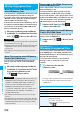
List of data files you can transfer
○
: Can be transferred
×
: Cannot be transferred
※
1 You cannot send/receive holidays and anniversaries.
※
2 You can send/receive up to 30 Area Mail messages
separately. (2,530 messages in total)
※
3 You cannot send/receive some files.
※
4 The file is sent/received after being converted to the vnt
file.
※
5 Includes Flash movies.
※
6 You cannot send/receive original animations and still
images recorded by One Seg.
※
7 You cannot send/receive ASF files and videos recorded
by One Seg.
※
8 The i-mode bookmarks may be deleted.
※
9
When sending/receiving bookmarks, the folder-sort setting
may not be reflected.
■
Storage location and order of received files
Transfer terms
Transferable data
One
item
Multiple
items
All items
Phonebook (Own number)
○×
Up to 1,000 items
Schedule
※1
○×
Up to 1,000 items
ToDo
○×
Up to 100 items
Received mail
※2
○×
Up to 2,500 items
Sent mail
○×
Up to 1,000 items
Draft mail
○×
Up to 20 items
Text memo
○×
Up to 20 items
Melody
※3, ※4
○×
×
Still image file
※4, ※5, ※6
○○
×
Moving image file
※4, ※7
○○
×
PDF file
※3, ※4, ※8
○×
×
ToruCa file
※4
○○
Up to 495 items
Bookmark (i-mode/Full
Browser)
※9
○×
Up to 100 items
each for i-mode
and Full Browser
Location service information
○×
Up to 5 items
Data Storage location/Order
Phone
book
(Own
number)
receive one
data
The phone number is stored to the
lowest empty memory number in
“010” through “999” in the
Phonebook. If all memory numbers
“010” through “999” are occupied,
the phone number is stored to the
lowest empty memory numbers in
“000” through “009” (two-touch dial).
receive all
data
Stored in the same memory
number as that of the sender.
Schedule receive one
data
Stored with the starting date/time
of the schedule event.
receive all
data
Stored with the same date and
time as those of the sender.
ᵡᶍᶌᶒᶇᶌᶓᶃᶂ