
User's Manual Part 2







235
GPS Function
You can specify the start point and destination, and
search the route. The route you can go through on foot,
by public transportation, or by car are displayed. After
you search the route, the voice and display navigate
you to your destination.
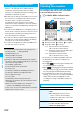
1
Map View display
l
[
メニュー
(Menu)]
ナビをする
(Navigate)
ナビをする
(Navigate)
2
出発地
(Start point)
Select a setting method.
現在地
(GPS) [Current location (GPS)]
. . . Measures and sets the current location.
フリーワード検索
(Keyword search)
. . . Searches and sets the start point by keywords.
地図上で指定
(Specify on map)
. . . Specifies the start point on the map.
TEL/〒検索
(TEL/ZIP code search)
. . . Searches and sets the start point by the phone
number or zip code.
住所一覧から
(From address list)
. . . Selects the address and sets the start point.
ジャンルから
(From genre)
. . . Selects a genre and sets the start point.
履歴から
(From record)
. . . Sets the start point on the map previously displayed.
登録地点から
(From stored point)
. . . Sets the start point from the location information stored in
this software program, on the server, or in the Phonebook.
自宅
(Home)
. . . Sets the start point from the location information of
your home.
出発地の確認
(Confirm start point)
. . . Confirms information about the start point.
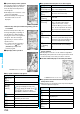
3
目的地
(Destination)
Select a setting method.
フリーワード検索
(Keyword search)
. . . Searches and sets the destination by keywords.
地図上で指定
(Specify on map)
. . . Specifies the destination on the map.
TEL/〒検索
(TEL/ZIP code search)
. . . Searches and sets the destination by the phone
number or zip code.
住所一覧から
(From address list)
. . . Selects the address and sets the destination.
ジャンルから
(From genre)
. . . Selects a genre and sets the destination.
履歴から
(From record)
. . . Sets the destination on the map previously displayed.
登録地点から
(From stored point)
. . . Sets the destination from the location information stored in
this software program, on the server, or in the Phonebook.
自宅
(Home)
. . . Sets the destination from the location information of
your home.
目的地の確認
(Confirm destination)
. . . Confirms information about the destination.
i
[
拡縮
(Enlarge/
Reduce)]
Shows the bar that shows reduced scale. To
enlarge and display the map, press
Zo
, and
to display the details, press
Xo
. Press
i
[
閉じる
(close)] to fix the reduced scale,
and then to clear the bar.
Searching Route and Navigating Yourself to
Destination by Voice and on Display
Key operation Action
4
時間指定
(Specify time)
Select an item.
現時刻で検索
(Search by current time)
. . .Searches the route by the current time.
出発時刻指定
(Specify start time)
. . .Specifies the start time and searches the route.
到着時刻指定
(Specify arrival time)
. . .Specifies the arrival time and searches the route.
終電を利用
(Use last train)
. . .Searches the route by the last train of the day.
5
条件設定
(Set conditions)
Select a condition.
乗換条件
(Transfer conditions)
. . .Select transfer condition from “
早い
(Fast)”, “
安い
(Cheap)”, and “
楽々
(Easy)”.
徒歩ルート
(Foot route)
. . .Select a foot route from “
おまかせ
(Free)”, “
屋根多い
(Many roofs)”, and “
階段少ない
(Less stairs)”.
特急利用
(Use special express)
. . .Select whether to use special expresses when the
total distance is less than 100 km.
通常利用車種
(Ordinary type of vehicles)
. . .Select a type of vehicle.
6
上記で設定
(Fix as specified above)
7
ルートを検索
(Search the route)
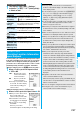
You can search the route by “
で検索
(Search by )” of Total Navi, or “
のみで検
索
(Search by only )” that searches only routes by
cars. Up to six routes are displayed as search results.
When the routes using different transportation are found,
the characteristics of the routes are displayed by the
icons shown below:
早
(Fast): Arrival time is early.
安
(Cheap): Fare is cheap.
楽
(Easy): Transfer is less.
オススメ
(Recommendable):
Route provided with three conditions, “
早
(Fast)”, “
安
(Cheap)”, and “
楽
(Easy)”.
有料
(Charged): Route by cars using toll roads
一般
(Ordinary): Route by cars using ordinary roads
p
To store the route, select “
ルートを登録
(Store route)”.
8
Select a route
ナビ・ルート確認
(Navi/Confirm route)
ナビ
(Navi) or
ナビ(省電力)
[Navi (power
saver)]
Navigation to the destination starts.
p
To confirm the route, select “
ルート確認
(Confirm
route)”.
p
To check the timetables, select “
時刻表
(Timetables)”.
ᵡᶍᶌᶒᶇᶌᶓᶃᶂ