
User's Manual Part 2







234
GPS Function
■
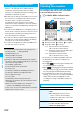
Top menu display and its operation
The respective menus are displayed on
the TOP display. When you close the
menu, the map retrieved by the last
search appears.
p
The displays are for reference, so the
actual ones might differ.
p
At the first start-up, the usage rules
and caution items on use are
displayed.
◆
When 91 days have passed without registering yourself
as a member
At the first start-up after 91 days, the
message telling that your privilege to
use the functions is limited, and the
message that refers to the registration
site appear. The same messages
appear when you select a menu for
optional services.
※
To register yourself as a member,
access “
ゼンリン 地図+ナビ
(ZENRIN/map+navi)” via this
software program.
■
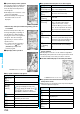
Map display and its operation
◆
Key operation when the map appears
TOP display
©
ZENRIN DataCom CO.,LTD. 2007
Map View display
Key operation Action
l
[
メニュー
(Menu)]
Shows the menu.
Oo
Shows the quick access menu.
i
[
拡縮
(Enlarge/
Reduce)]
Shows the bar that shows reduced scale.
To enlarge and display the map, press
Zo
, and to display the details, press
Xo
.
Press
i
[
閉じる
(close)] to fix the
reduced scale, and then to clear the bar.
Mo
Moves the map up, down, left, and right.
r
Closes the menu, or returns to the point
retrieved by the first search.
a
Turns the map to the left.
0
Turns the map northward.
s
Turns the map to the right.
◆
Key operation when the quick access menu appears
■
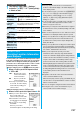
The Search Result display for the nearby area details
and its operation
p
The display is for reference, so the actual one might differ.
p
The display and operation are for when you show the search
result on the map, not for when you select it on the list.
◆
The Search Result display for the nearby area details
◆
Key operation when the Search Result display for the
nearby area is shown
※
When the cursor is not placed over the shop retrieved by the
search, the quick menu appears.
Key operation Action
Zo
[
周辺を調べる
(Check nearby area)
]
Checks the details of the nearby area
mainly on the displayed map.
Xo
[
ココへナビ
(Navi to)]
Specifies the start point and searches the
route to the center of the map.
Co
[
ココを送信
(Send here)]
Sends the URL for the displayed map via
i-mode mail.
Vo
[
ココを登録
(Store here)]
Stores the positional information of the
center of the map in this software
program, on the server, or in the
Phonebook. When you store it on the
server, the stored point can be shared
with your personal computer as well.
Oo
[
地図へ
(To
map)]
Closes the quick access menu.
1
[
3D/パノラマ
(3D/Panorama)]
Shows the point from where 3D
intersection or panoramic images can be
viewed. Select the point to display 3D
intersection and panoramic images.
2
[
ビル/テナ
ント
(Building/
Tenant)]
Shows the buildings around and can click
to check the tenants in the buildings if
any.
©
ZENRIN DataCom CO.,LTD. 2007
Key operation Action
Oo
Confirms detailed information about search results.
Mo
Moves the map up, down, left, and right.
5
Re-searches the center area of the map
being displayed.
4
Shows the previous search results.
6
Shows the next search results.
l
[
メニュー
(Menu)]
Shows the menu.