
User's Manual Part 2








233
GPS Function
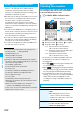
1
m
LifeKit
GPS
i
α
ppli
The list of i-
α
ppli programs that support GPS is displayed.
Select an i-
α
ppli program to start it.
p
See page 211 for the Software List.
The pre-installed “
地図アプリ
(Map Application)”
enables you to check the map for where you are
currently in or for the place you specify, or check your
nearby area for details by using the GPS function and
map. You can then navigate yourself to the destination
by vehicle, on foot, or by car.
Further, you can easily get train information by voice
input.
p
You are separately charged a packet communication fee.
You are advised to subscribe to Pake-Houdai/Pake-Houdai
Full for using “
地図アプリ
(Map Application)”.
p
If you delete this application program and then when you
want to resume it, download it from “
iエリア−周辺情報−
(i-area -Local Information-)”.
p
This application program is a mail-linked i-
α
ppli program, so
it is not available when the mode of 2in1 is set to B Mode.
p
Note that we are not held responsible for the accuracy and
promptness of the map and route information.
p
While driving, ensure that a person other than the driver
operates “
地図アプリ
(Map Application)”.
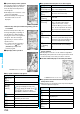
Paste to mail
You can paste the current location information
converted to a URL to text and compose
i-mode mail.
YES
Go to step 2 on page 172.
p
The URL of the location information to be
sent is displayed on i-mode compatible
phones only.
Add to
phonebook
You can store the current location information
in the Phonebook.
YES
Go to step 1 on page 84.
Attach to
image
You can store the current location information
in the image.
Go to step 1 of “Displaying Images” on
page 274.
GPS Compatible i-
α
ppli
Using GPS Compatible i-
α
ppli
Function menu
Operation/Explanation
<>
Information
p
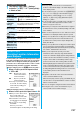
When you use a GPS compatible i-
α
ppli program, the
location information is sent to the information provider of the
i-
α
ppli program you use.
p
You need to set “Location usage” of “Software setting” to
“ON” when you use the GPS function on a GPS compatible
i-
α
ppli program.
Using “
地図アプリ
(Map Application)”
■
Standard and optional services
The standard and optional services are available with this
application program.
Standard service: Provided by DoCoMo (charge free).
Optional service: Provided by ZENRIN DataCom (charged).
You can use the optional services charge free except traffic
information for up to 90 days from when you have started this
application program for the first time. To use the optional
services from 91 days on, you need to register yourself as a
member of “
ゼンリン 地図+ナビ
(ZENRIN/map+navi)”
(charged) provided by ZENRIN DataCom.
Even when you register yourself as a member while you are
using this software program, you do not need to re-download
it. You can use the software program as it is.
Menu Descriptions
Up to
90 days
From 91
days on
今いる場所
(Current
point)
p
You can use GPS to see the
map you are currently in, or send
the map by i-mode mail.
p
You can leave your footprint on
the map where you are currently
in, check your traces, and see
other people’s footprints.
Free Free
周辺を調べる
(Check
nearby area)
p
You can check the details of shops,
facilities, or iD member stores in
the area where you are currently in
or you specify, and can download
coupons from gourmet information.
p
You can check nearby weather
status or spare spaces in
parking lots.
Free Free
地図を見る
(See map)
p
You can enter a keyword, a
genre, address, or phone
number to see the map.
Free Free
p
You can check the points stored
in this software program, on the
server, or in the Phonebook, or
check the map for the points
retrieved by the previous search.
p
After the storage on the server,
the stored points are shared with
your personal computer.
Free
Charged
ナビをする
(Navigate)
p
You can navigate yourself to the
destination by vehicle, on foot, or
by car.
p
You can navigate yourself easily
to your home you have stored.
Free
Charged
乗換案内
(Transfer
guide)
p
You can check the train transfer
guides and timetables.
p
You can check the map for train
routes and set an alarm before
your departure.
Free
Charged
おしゃべり
検索
(Voice
search)
p
By voice input, you can easily
checks the details of your nearby
area or see the map.
Free Free
p
By voice input, you can easily
guide you to train transfers.
Free
Charged
設定/直感★
(Settings/
Intuition
★
)
p
You can move the map or 3D map
by inclining the FOMA phone.
Free Free
p
You can set how to show the
map or navigation, and check
how to use them.
Free Free
ᵡᶍᶌᶒᶇᶌᶓᶃᶂ