
User's Manual Part 2







232
GPS Function
p
GPS is operated by the United States Department of
Defense, so the GPS radio wave conditions might be
controlled (accuracy deterioration, radio wave supply
suspension, etc.) depending on the defense strategy of the
United States Department of Defense.
p
Note that we do not take any responsibility for a loss such as
pure economic loss resulting from the facts that you have
missed the chance to check the measurement
(communication) results, which have been caused by
external factors such as malfunctions, erroneous operations,
troubles, or power failure (including battery shortage) on the
FOMA phone.
p
You cannot use the FOMA phone as a navigating system for
aircraft, vehicles, and people. Therefore, note that we are not
held responsible for any damage resulting from the use of
the location information for navigation.
p
You cannot use GPS as a high-accuracy measuring device.
Note that we do not take any responsibility for the damage
caused by an error in the location information.
p
You cannot use the GPS function when the FOMA phone is
out of the service area (or overseas).
About Using GPS Function
Information
p
You cannot use the GPS function in the following cases:
・
During Lock All
※
・
During Self Mode
・
During Omakase Lock
※
・
While the UIM is not inserted
※
Provide Location is available.
p
As GPS uses radio waves transmitted from the satellites,
note that you cannot or might have difficulty to receive radio
waves in the following conditions:
・
In a building or right under it
・
In the basement, tunnel, ground, water
・
In a bag or case
・
In densely crowded areas with buildings and houses
・
In densely crowded trees and right under them
・
Close to high-tension wires
・
In a car or train
・
In bad weather such as heavy rain and snow
・
When there are obstacles (persons and articles) around
the FOMA phone.
・
When you cover the displays, keys, microphone, or
speakers of the FOMA phone with your hand.
In these cases, an error in the obtained location information
might become 300 meters or more.
You can measure your current location and display it.
You can display a map of the location, and send the
location information by mail as well.
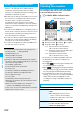
1
m
LifeKit
GPS
Position location
The current location is displayed by the latitude and longitude.
…
Measurement date
…
Latitude
…
Longitude
…
Geographic datum
…
Accuracy
★★★
: Almost accurate location information
(Error is about less than 50 meters)
★★☆
: Relatively accurate location information (Error
is less than about 300 meters)
★☆☆
: Approximate location information
(Error is about 300 meters or more)
The accuracy is an estimate. It might differ from actual
one depending on the radio wave conditions in the
surrounding area.
p
Press
l
( ) to measure again in “Quality mode”
(see “Positioning Mode” on page 239).
p
When “ ” is displayed at bottom right of the display
during measuring, press
i
and select “OK” to display
the location using the information during measuring.
p
You can measure the location also by pressing and
holding
1
for at least one second from the Stand-by
display. After measuring, the FOMA phone works
according to the setting of “GPS Button Setting” (see
page 239).
Position Location
Checking Your Location
<>
Blinks during measuring
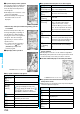
Function Menu while Current Location is Displayed
Function menu
Operation/Explanation
Read a map
You can display a map by connecting a map site.
YES
p
After displaying the map, you can use
“i-area” to search for the surrounding
information. For details about “i-area”, refer
to the DoCoMo web site.
Run
i
α
ppli
You can use the current location information
on a GPS compatible i-
α
ppli program.
Select an i-
α
ppli program.