
User's Manual Part 2







230
Osaifu-Keitai/ToruCa
1
m
Osaifu-Keitai
Settings
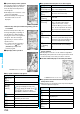
Do the following operations.
ToruCa Settings
Setting about ToruCa
<>
Item Operation/Explanation
Receive
ToruCa
You can set whether to obtain ToruCa file
from a scanning device using the IC card
function.
Accept or Reject
Receiving
display
You can set whether to display the detailed
ToruCa File display when you obtain a
ToruCa file while the Stand-by display is
shown.
ON or OFF
Check same
data
You can set whether to check the same
ToruCa file is already obtained before
obtaining a ToruCa file from a scanning
device.
ON or OFF
ON
. . . Checks and does not obtain a new
ToruCa file if the same ToruCa file is
already obtained.
OFF
. . Does not check. Obtains even the
same ToruCa file.
Auto reading
You can set whether to have the available
ToruCa files automatically recognized for
when you place the FOMA phone over the
scanning device.
Accept or Reject
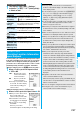
Information
<Check same data>
p
The ToruCa files stored in “Used ToruCa” or expired
ToruCa files are not included as target files.
<Auto reading>
p
If “Auto reading” is set to “Reject”, you might not be able to
use ToruCa files.
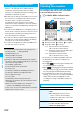
To prevent the IC card function from being used by
others, you can set the Osaifu-Keitai, obtained ToruCa,
or iC communication disabled.
p
If the battery runs out when the IC card is locked, the IC card
stays locked.
1
Press and hold
m
for at least one second.
“ ” appears and IC Card Lock is set.
p
To release IC Card Lock, perform the same operation
and enter your Terminal Security Code.
When you set Timer Lock At Close, the display for
releasing IC Card Lock appears also by opening the
FOMA phone.
When you set “PIM/IC security mode” to “Face reader”,
follow the operation of “Use Face Reader to Release
Lock” on page 124.
When you set it to “Double security”, enter your
Terminal Security Code after the operation on
page 124.
You can set whether to lock the IC card function while
the power is turned off.
1
m
Settings
Lock/Security
Lock setting
or
m
Osaifu-Keitai
IC card lock set.
2
IC lock (power-off)
Enter your Terminal Security Code
Select an item.
Setting before OFF
. . . . . . . . Follows the setting at just before the
power-off.
Lock
. . . . Sets IC Card Lock.
IC Card Lock
Locking IC Card Function
<>
IC Lock (Power-off)