
User's Manual Part 2






224
Osaifu-Keitai/ToruCa
The convenient i-mode function which uses the IC card
function of the i-mode phone (i-mode FeliCa), or the
i-mode phone with the IC card mounted is called
“Osaifu-Keitai”.
FeliCa is one of the non-contact IC technologies that
enables you to read and write data just by placing it
over a scanning device.
Just by placing Osaifu-Keitai over the scanning device
in a shop, you can pay by electronic cash or use it as a
air ticket or reward card. Mobile phones have become
one of easy-to-use tools.
Further, different from the existing FeliCa compatible
non-contact IC card, the new one enables you to
deposit electronic money by using the communication
into the IC card inside the Osaifu-Keitai or to check
your account for balance or usage details.
※
To use Osaifu-Keitai compatible service, you need to make
the settings from i-
α
ppli (IC application) program which
supports the IC card function [for details, inquire to IP
(Information Provider)].
※
For cautions on using each Osaifu-Keitai compatible
service, refer to “Mobile Phone User’s Guide [i-mode]”.
p
Data on the IC card might be lost or deformed owing to the
malfunction of Osaifu-Keitai. (When we keep your
Osaifu-Keitai for repair, we cannot keep it with data files left,
so the data files shall be deleted beforehand by yourself as a
rule.) Use the backup service of the IP (Information Provider)
for supports such as reissue, restoration, temporary storage
or transfer of data files, except for the data transfer by iC
transfer service. The availability of backup services and their
usage conditions (necessary applications, charges, etc.) and
the support availability of iC transfer service differ depending
on the service. Contact the IP (Information Provider)
beforehand. For your important data files, be sure to use the
service with backup support.
p
In any case including malfunction or model change, we
cannot be held responsible for the loss or deformation of
data on the IC card or other losses caused regarding
Osaifu-Keitai compatible services.
p
If your Osaifu-Keitai has been stolen or lost, inquire of the
provider for Osaifu-Keitai compatible service you use about
ways of dealing with the trouble, immediately. With this
FOMA phone, you can use Omakase Lock or IC Card Lock.
(See page 120, and page 230)
What is Osaifu-Keitai?
iC transfer service
※1
is the service for transferring the
data files on the IC card at a time
※2
to your new
Osaifu-Keitai mobile phone
※3
when you replace your
Osaifu-Keitai mobile phone such as at the time of
model change or malfunction. After completing the
transfer of data files on the IC card, just download
Osaifu-Keitai compatible i-
α
ppli program, and then you
can easily use the Osaifu-Keitai services.
iC transfer service is available at the service counters
such as a DoCoMo shop nearby.
For details, refer to “Mobile Phone User’s Guide
[i-mode]”.
※
1 You are charged a handling fee for using iC transfer
service. (You might not be charged at times.)
In addition, you are charged a packet communication
fee for downloading iC application programs and
respective settings.
※
2 Some Osaifu-Keitai services are not supported. The
services that are not supported are deleted when you
use iC transfer service, so ensure that you use a back-
up service for the Osaifu-Keitai services or delete them
in advance.
※
3
iC transfer service is available when new Osaifu-Keitai
mobile phone is iC transfer service compatible model.
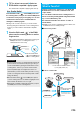
You can start the Osaifu-Keitai compatible i-
α
ppli from
the Software List or IC Card List. By using Osaifu-Keitai
compatible i-
α
ppli, you can read/write the data inside
the IC card and use convenient functions such as
depositing electronic money or traffic tickets, or
checking your account for the balance and usage
details on the mobile phone.
p
Take care of your Terminal Security Code and password
used for each service not to reveal to anyone.
p
When you start or download the Osaifu-Keitai compatible
i-
α
ppli program for the first time, the message “Use IC card
for current UIM?” appears. When you select “YES”, you
cannot use the IC card function afterward unless you insert
the same UIM.
To use the IC card function with another UIM, insert the
currently supported UIM first and then deleted all the Osaifu-
Keitai compatible i-
α
ppli programs. Otherwise, you cannot
use it.
p
Reading and writing data from the software program and to
the IC card is suspended in the following cases:
In that case, the read or written data is discarded. The
operation after the communication ends differs depending on
the service you use.
・
When a call comes in while i-
α
ppli is running
・
When the battery goes flat
What is iC Transfer Service?
Starting Osaifu-Keitai
Compatible i-
α
ppli
Read and Write Data inside the IC Card