
User's Manual Part 2





220
i-
α
ppli
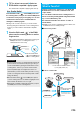
“DCMX” is a credit service that supports
“iD” and offered by NTT DoCoMo
Group. DCMX provides DCMX mini that
enables you to use up to ¥10,000 per
month and respective DCMX services
that enable you to use more amount
and save up DoCoMo points.
With “DCMX mini”, you can easily make
a subscription from this application
program and immediately use Mobile
Phone Credit.
※
1The online screening is conducted at your subscription for
DCMX mini. For subscribing to a service other than “DCMX
mini”, you are connected to the subscription page for i-
mode.
※
2The checking function for usage status and others is
available for “DCMX mini” only.
※
3You might be required to enter your pin number under
certain conditions.
p
For service contents and details of
subscriptions, refer to the i-mode site of
DCMX.
・
i-mode site:
i
Menu
→
DCMX iD
DCMX
クレジットアプリ
(DCMX Credit Application)
※
The display is for reference.
The actual one may differ.
Information
p
To start this application program for the first time, you need
to agree with “
ご利用上の注意
(Cautions in use)”.
p
You are charged a packet communication fee for settings
and operations.
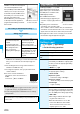
Subscribing for membership/Screening
※
1
Use
No troublesome deposit is
required!
Just by placing the setup
completed mobile phone over
the scanning device at a
shop, you can enjoy
shopping without signing
※3
.
Check
※
2
You can check, on the
application program, the
balance for the current
month and detailed account!
Change
When updating your card or
changing models, you can
apply from the application
program.
Setting card information
QR code for
accessing the site
■
Cautions on Osaifu-Keitai compatible i-
α
ppli
Note that we take no responsibility for any information set on
your IC card.
“FOMA
通信環境確認アプリ
(FOMA
Communication Environment Check
α
ppli)” enables you to check whether
the FOMA phone is available at the
FOMA High-Speed Area.
p
Use FOMA Communication
Environment Check
α
ppli with your
consent to “
ご利用の注意
(Cautions in
use)”.
p
Depending on the communication
environment (such as weather, radio
wave conditions, network conditions state) at communication
environment check, the different result or “out of service” might
appear even in the same area or at the same period of time.
p
You might not be able to check correctly if you use another
function while using this application program.
1
m
i-
α
ppli
i
α
ppli settings
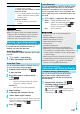
Do the following operations.
FOMA
通信環境確認アプリ
(FOMA Communication Environment Check
α
ppli)
i
α
ppli Settings
Setting i-
α
ppli
※
The display is for reference.
The actual one may differ.
<>
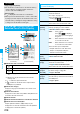
Item Operation/Explanation
Auto start setting
See page 221.
Disp. software
info
See page 211.
Preferred tone
You can set which sound to be output
preferentially, from MUSIC or i-
α
ppli program,
for when you start an i-
α
ppli program during
music playback.
MUSIC or
i
α
ppli
α
Backlight
You can set the backlight operation for when
an i-
α
ppli program is running.
Select an item.
Depend on system
. . . Follows the setting of “Backlight”.
Depend on software
. . . Follows the setting of each software program.
Constant light
. . . Lights constantly.
α
Power saver
You can set to Power Saver Mode to
decrease battery consumption by suspending
the i-
α
ppli program temporarily for when you
close the FOMA phone during i-
α
ppli running.
ON or OFF
p
This setting is valid from when an i-
α
ppli
program starts until it closes.
p
Even when this function is set to “ON”,
Power Saver Mode becomes invalid if
“Power saver” that can be set for each
i-
α
ppli program is set to “OFF”.