
User's Manual Part 2





219
i-
α
ppli
T
his is a convenient application program
that bundles the TV program list and AV
remote-controller function and the
monthly charge is free.
Anytime and anywhere you are, you can
easily obtain the terrestrial digital,
terrestrial analog or BS digital TV program
information for the desired time zone. You
can know about titles, contents, and start/
end times of TV programs. Further, you
can start a One Seg program from the
program list and vice versa.
If there is any program you want to
watch, you can book timer recordings of the program on a
DVD hard disk recorder over the Internet. (You need to have a
DVD hard disk recorder that supports the remote timer
recording function. And you need to perform initial settings of
this application program.) Further, you can search for the
program information by keywords such as program genres or
celebrities you like. You can also remote-control a TV, video
recorder, and DVD player. (Some models are not supported.)
p
See “Using Infrared Remote-controller Function” on
page 306 for details of the infrared remote-controller.
p
You need to make the initial settings and to agree with the
usage rules for the first time.
p
You are separately charged a packet communication fee.
p
To use this
application
program overseas, set the date/time
for the FOMA phone to Japan time.
p
For details, refer to “Mobile Phone User’s Guide [i-mode]”.
p
You cannot delete G
ガイド番組表リモコン
(G Guide
Program List Remote-controller).
p
G
ガイド番組表リモコン
(G Guide Program List Remote-
controller) is a mail-linked i-
α
ppli program, so you cannot use
it in B Mode of 2in1.
G
カ゛イト゛
番組表
リモコン
(G Guide Program List Remote-controller)
■
About program booking function
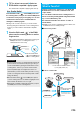
You can select and book a program you want to watch from
the program list of this
application program.
How to book a program
1. Software List
Gガイド番組表リモコン
(G Guide Program
List Remote-Controller)
Highlight a program to be booked
and press
i
()
視聴予約
(Book program)
予約実行
(Execute booking)
Follow the instructions on
the display.
■
About timer recording function
You can select a program you want to record and set a timer
recording from the program list of this application program.
How to set a timer recording
1. Software List
Gガイド番組表リモコン
(G Guide Program
List Remote-Controller)
Highlight a program to be set for
a timer recording and press
i
()
♯ワンセグ録
画予約
(One Seg
timer recording
)
予約実行
(Execute
booking)
Follow the instructions on the display.
(You can set a timer recording also by highlighting a
program and pressing
s
.)
※
The display is for reference.
The actual one differs.
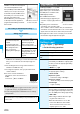
Local programs according
to your region appear on
your display.
Chargeless electronic money “iD” is a
service that enables you to do shopping
by placing your Osaifu-Keitai or a credit
card with “iD” mounted over a scanning
device. You can do shopping very
easily without signing. Depending on
the card publishing company, cashing
is also supported.
p
For using “iD”, you need to subscribe
to a card publishing company that
supports “iD”, as well as an Osaifu-Keitai on which the
specified settings have been completed by the iD application
program on the card application program provided by the
card publishing company or a credit card that mounts “iD”.
p
When you use “iD” on Osaifu-Keitai, start the iD application
program, agree with “
ご利用上の注意
(Caution in Use)”, and
then complete the specified settings at the iD application
program end. Then download or start the card application
program, and perform the specified settings at the card
application program end.
p
The expense (annual fees, etc.) charged for the service that
supports “iD” varies depending on the card publishing
company.
p
You are charged a packet communication fee for
downloading the iD application program, and the card
application program.
p
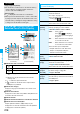
For the information about “iD”, refer to the
i-mode site of “iD”.
i-mode site
i
Menu
→
メニュー
/
検索
(Menu/
Search)
→「
iD
」
■
About remote timer recording function
If you have a DVD hard disk recorder that supports the
remote timer recording function, you can set timer
recordings from the program list of this
application
program
over the Internet even if you are away.
For remote timer recording, you need to make initial settings
of this
application
program.
How to make initial settings
1. Set the Internet connection for the DVD hard disk
recorder
(Refer to the instruction manual of the DVD hard disk
recorder you use.)
2. Software List
Gガイド番組表リモコン
(G Guide
Program List Remote-Controller)
i
()
リモート録画予約
(Remote
timer recording
)
Operate following the guidance.
How to set timer recordings
After the initial settings, specify your desired program and
select “
リモート録画予約
(Remote timer recording)”. Then,
the DVD hard disk recorder specified on this
application
program is connected via the Internet, and you can set timer
recordings.
p
You are separately charged a packet communication fee.
iD
設定アプリ
(iD Setting Application)
※
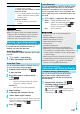
The display is for reference.
The actual one may differ.
QR code for
accessing the site