
User's Manual Part 2



146
Camera
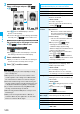
You can set the file restrictions for when you save the
shot still or moving image. The operation of attaching
to i-mode mail is disabled at the receiving end who has
received the image as the first distribution.
1
Finder display
i
()
Storage setting
File restriction
or
Post View display in Photo Mode, Movie
Mode or Photo sending/Detailed display in
Continuous Mode
i
()
File restriction
2
File unrestricted or File restricted
■
For “File unrestricted”
■
For “File restricted”
1
Finder display
i
()
Auto timer
ON or OFF
Enter a delay time (seconds).
p
Enter from “01” through “15”, in two digits.
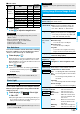
File Restriction
Information
p
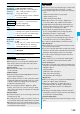
Even when you set “File restriction” to “File restricted”, the
still or moving images can be output from the destination
mobile phone by transmitting the images using infrared data
exchange or by copying them to the microSD memory card.
p
After saving, you can use “File restriction” on page 275 to
change the settings.
p
When you set “File size setting” to “Long time” in Movie
Mode, “File restriction” becomes “File unrestricted”.
Auto Timer
At Camera start-up OFF
First distribution
Your FOMA
phone
Destination mobile
phone
Attach to mail
Attach to mail
Secondary distribution
First distribution
Your FOMA
phone
Destination mobile
phone
Attach to mail
Attach to mail
Secondary distribution
You can use the outside camera to scan JAN codes and
QR codes and store them as data.
From the scanned data, you can make calls, compose
i-mode mail messages, and access Internet web pages,
and so on.
■
When scanning with Bar Code Reader
p
Take the character strings as large as possible within the
guide frame.
p
Autofocus works when you scan a code about 10 cm or more
away from it. When you scan a code in the out-of-focus state,
the recognition rate lowers.
p
Scan so that the camera is in parallel with the code.
■
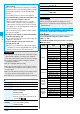
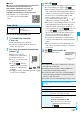
JAN Code
JAN Code is a bar code that denotes numerals with the
vertical bars of a different width.
You can scan 8-digit (JAN8) and 13-digit (JAN13) JAN codes.
p
“4942857112597” is displayed
when you scan this bar code
with the FOMA phone.
■
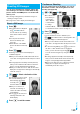
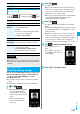
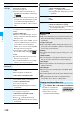
When Auto Timer is set to “ON”
“ ” appears on the Finder display.
If you press
Oo
( ), a confirmation tone sounds and
“ ” blinks. The photo light flickers every about 1 second until
about 5 seconds before shooting. From about 5 seconds before
shooting, the photo light flickers every about 0.5 second, and
the confirmation tone sounds every about 1 second. Shooting
takes place after the set delay time has elapsed.
p
To cancel shooting, press
l
() or
r
while the
photo light is flickering. Even if you cancel shooting, “Auto
timer” stays set to “ON”.
p
You can shoot immediately by pressing
Oo
()
before the delay time has elapsed.
p
When you shoot, a confirmation tone sounds regardless of
the settings such as Manner Mode. The sound volume for
the confirmation tone cannot be changed.
Information
p
You cannot use Auto Timer in “Manual” of Continuous Mode.
p
Auto Timer will be set to “OFF” when shooting ends.
Bar Code Reader
Using Bar Code Reader
<>
Guide frame