
User's Manual Part 2




216
i-
α
ppli
■
COLUMNS
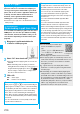
1
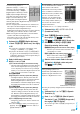
Select a menu item.
VS CPU
. . . Play in the VS computer mode. When you
have won whole 10 rounds, you beat the
game. Select “
最初から
(from the
beginning)”. When a data file saved halfway
is found, you can select “
続きから
STAGEXX (from STAGEXX)”.
※
XX denotes the stage number.
VS HUMAN
. . . . . . . . . . Play in the mode in which you can use
Bluetooth communication to have a match
against others. For a Bluetooth match, see
“About a Bluetooth match” on page 216.
エンドレス
(Endless)
. . . . . . . . . . Play in the score attacking mode.
First select the level of difficulty. The starting
level, score, and color of jewels vary
depending on the level of difficulty.
ハイスコア
(High-score)
. . . . . . . . . . Displays the high score of the “
エンドレス
(Endless)” mode.
BGM
変更
(Change BGM)
. . . . . . . . . . Change BGM.
ヘルプ
(Help)
. . . . . . . . . . Displays how to play COLUMNS.
© SEGA
■
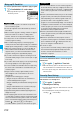
About a Bluetooth match
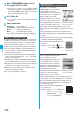
When you select “
ふたりでぷよぷよ
(Futari de PuyoPuyo)”
on the “
ぷよぷよ〜ん
(PuyoPuyon)” menu, or when you
select “VS HUMAN” on the COLUMNS menu, you need to
do the following to connect to your opponent using
Bluetooth:
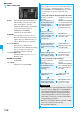
To have a match with an unregistered player (first time)
To have a match with a registered player
Operation at your side
(1P side)
Operation at your opponent
(2P side)
Select “
未登録の相手と対
戦
(1P
側
) [Match with an
unregistered player
(1P side)]” and select
“YES”.
He/She selects “
未登録の相
手と対戦
(2P
側
) [Match with
an unregistered player (2P
side)]” and enter his/her
Terminal Security Code.
Select the opponent’s
FOMA phone you have
found, select “YES”, and
enter your Terminal
Security Code.
When he/she is
requested to connect, he/
she selects “YES”.
Enter the same Bluetooth
passkey as that of the
opponent and select “
確定
(OK)”.
He/She enters any
Bluetooth passkey and
select “
確定
(OK)”.
Check that the 2P side is
waiting for request and
select “
準備完了
(Ready)”.
When he/she receives
your request, he/she
selects “
はい
(YES)”.
Operation at your side
(1P side)
Operation at your opponent
(2P side)
Select “
登録済の相手と対
戦
(1P
側
) [Match with a
registered player
(1P side)]”.
He/She selects “
登録済の
相手と対戦
(2P
側
) [Match
with a registered player
(2P side)]”.
Select the opponent’s
FOMA phone.
He/She selects your
FOMA phone.
Check that the 2P side is
waiting for request and
select “
準備完了
(Ready)”.
When he/she receives
your request, he/she
selects “
はい
(YES)”.
Information
p
When “
登録済の相手と対戦
(1P
側
) [Match with a registered
player (1P side)]” or “
登録済の相手と対戦
(2P
側
) [Match
with a registered player (2P side)]” is selected with no
Bluetooth device registered, the confirmation display
appears asking whether to search for another player.
When “YES” is selected, see “To have a match with an
unregistered player (first time)”.
p
When you select a Bluetooth device other than a FOMA
phone, the connection results in an error.
p
See page 348 for Bluetooth.