
User's Manual Part 2





202
Mail
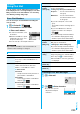
This service enables you to receive reports such as
emergency earthquake alerts distributed from the
Japan Meteorological Agency.
p
You can receive Area Mail without i-mode contract.
p
You need to set “Receive setting” to receive Area Mail.
※
See page 202 for “Receive setting” of Area Mail.
p
You might not be able to receive Area Mail in the following cases
:
・
During a call (voice call/videophone call)
・
During packet communication (i-mode communication,
data communication, PushTalk communication)
・
During updating software program
p
You cannot receive Area Mail messages in the following cases:
・
During Omakase Lock
・
During international roaming
・
During Self Mode
※
When you could not receive the messages by the reasons
above, you cannot receive them again.
When you receive an Area Mail message, the ring tone
for Area Mail sounds. The “Ring volume”, “Ring time”,
and “Vibrator” settings follow that of “Mail”.
When you receive an emergency earthquake alert, a
dedicated buzzer (alarm) sounds, and the vibrator
works to notify you. “Ring volume” is fixed to “Level
4”, and “Vibrator” is fixed to “Pattern 2”, you cannot
change their settings. You can use “Area mail settings”
to set “Beep time”.
Up to 30 Area Mail messages are saved separately from
i-mode mail messages and SMS messages in the Inbox.
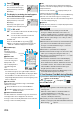
1
When an Area Mail message arrives, “ ” blinks
and the message telling its arrival appears.
p
If you press any key, the former
display returns. (The transit time
varies depending on the setting for
“Mail/Msg. ring time”.
p
The details of some Area Mail
messages might be displayed when you receive them.
To clear it, press
Oo
,
r
, or
h
.
p
See page 186 for displaying Area Mail messages.
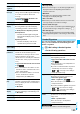
Operate file
(Save insert
image)
You can save the attached image and set it as
the Stand-by display, Wake-up display, or
another display. (See page 179)
Operate file
(Save BG
image)
Save BG image
YES
Select a destination folder.
Go to step 3 on page 159.
Operate file
(Save
D-pictograph)
You can save the all Decomail-pictographs
inserted into the text. (See page 194)
Add to
phonebook
See page 87.
Delete
YES
What is Area Mail?
Receiving Area Mail
Function menu
Operation/Explanation
Reception Result display
1
l
Area mail settings
Do the following operations.
Information
p
The buzzer sounds when you receive an emergency
earthquake alert with “Original” set to sound any of the
following tones:
・
Mail volume
・
Phone volume
・
Alarm volume
・
VM tone
・
Keypad sound
p
Even when “Vibrator” of “Original manner” is set to “OFF”, the
vibrator works if you receive an emergency earthquake alert.
p
When you receive a new Area Mail message with 30 Area
Mail messages saved, the read messages are overwritten
from the oldest. When all 30 messages are not read, they
are overwritten from the oldest one in order.
p
Whether the details of a received Area Mail message are
displayed or not depends on the setting by the Area Mail
message provider.
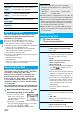
Area Mail Settings
Setting Area Mail
<>
Item Operation/Explanation
Receive setting
You can set whether to use Area Mail.
Read exemption clause thoroughly
Yes or No
Receive entry
You can register Message IDs for the reports to
be received other than emergency earthquake
alert. You can register up to 20 IDs.
<New>
Enter your Terminal Security Code
Enter a registration name
Enter a Message ID.
p
To edit a registered Message ID, highlight it,
press
l
( ), and then enter your
Terminal Security Code.
p
You can enter up to 15 full-pitch/30 half-pitch
characters for a registration name, and enter
4 half-pitch characters for a Message ID.
p
You can edit also by selecting “Edit” from the
Function menu. Select “Delete this” to delete
the Message ID, and select “Delete all” and
enter your Terminal Security Code to delete
all Message IDs.
p
You cannot edit/delete “Emergency
information”.
Beep setting
You can set whether to make the beep sound
for when you receive Area Mail message that
beeps.
ON or OFF
p
When you set “OFF”, the dedicated ring
tone for Area Mail sounds.
Beep time
You can set the duration the beep sounds.
Enter a beep time (seconds).
p
Enter it in two digit, from “01” through “30”.