
User's Manual Part 2





201
Mail
1
l
Inbox
MessageR or MessageF
Select a Message R/F to be displayed.
p
You can display Messages R/F also by
“
i
Message R/F
MessageR or MessageF”.
p
When you select an unread Message R/F, “ (pink)”
changes to “ ”.
p
Use
No
to check other Messages R/F.
p
When the text of Message R/F is long, use
Bo
to scroll
the display to check it. Also, you can press
m
()/
c
() or
<
/
>
to scroll page by
page.
■
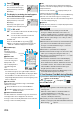
Message R/F List and Detailed Message R/F Display
Status of Message R/F
“ ” appears when protection is set.
Received date and time
The list shows the time for the Message R/F received today,
and shows the date for the Message R/F received until
yesterday. The detailed display shows the date and time the
Message R/F was received.
Subject
The data attached or pasted
The detailed display shows the data volume.
Display Message R/F
Reading Received Messages R/F
<>
Message R/F List Detailed Message R/F
display
(pink) Unread Message R/F
Read Message R/F
Valid melody file
Valid image file
Valid ToruCa file
Multiple attached files
Multiple pasted files
File set with the UIM restrictions
Detailed Message R/F
display
Message R/F List
Text of message
The phone number stored in the Phonebook is displayed as
the name stored in the Phonebook.
Function Menu of the Message R/F List
Function menu
Operation/Explanation
Protect
(Protect ON/
OFF)
You can protect a Message R/F not to be
overwritten or deleted.
You can protect up to 50 messages (Message
R and Message F each).
Protected messages are indicated by “ ”.
Protect ON/OFF
p
To release protection, perform the same
operation.
Protect
(Unprotect all)
Unprotect all
YES
Search/sort
(Sort)
You can rearrange the displaying order.
Sort
Select a displaying order.
Search/sort
(Filter)
You can display only Messages R/F that
satisfy the condition.
Filter
Select a displaying type.
Search/sort
(Display all)
After you execute “Sort” or “Filter”, you can
reset it and list all Messages R/F by “By date
↑
”.
Display all
No. of
messages
You can display the total number of
Messages R/F stored in the FOMA phone, as
well as the number of unread messages and
protected messages.
Delete
(Delete this)
Delete this
YES
Delete
(Delete
selected)
Delete selected
Put a check mark for
Messages R/F to be deleted
l
()
YES
Delete
(Delete read
mails)
You can delete all read Messages R/F.
Delete read mails
YES
Delete
(DEL all frm
folder)
You can delete all Messages R/F.
DEL all frm folder
Enter your Terminal
Security Code
YES
Information
<Search/sort>
p
To return to the former status, execute “Display all”.
p
If you close the List and re-open it, you can return to the List
of all items.
Function Menu of the Detailed Message R/F Display
Function menu
Operation/Explanation
Protect ON/OFF
See page 201.
Operate file
(Save attached
file)
You can save attached or pasted files.(See
page 185)
ᵡᶍᶌᶒᶇᶌᶓᶃᶂ