
User's Manual Part 2



188
Mail
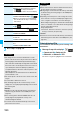
Subject
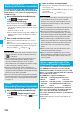
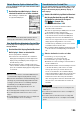
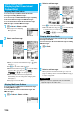
When “Mail list display” is set to “Date+sender/receiver subject”, the subject is displayed up to 11 full-pitch/22 half-pitch
characters. When set to “Date+subject”, it is displayed up to 7 full-pitch/14 half-pitch characters, however, for a mail message
with files attached, it is decreased by 1 full-pitch/2 half-pitch character/s as the icon is added at the top.
For SMS messages or Area Mail messages, the beginning of the text is displayed. (“SMS” or “Area Mail” is displayed on the
detailed display.)
In Dual Mode of 2in1, “ ” is displayed at the end of the subject or sender’s address of SMS/i-mode mail messages received
to Number B/Address B.
Attached or pasted data
The detailed display shows the data volume as well.
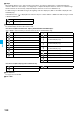
<For Inbox List (Date+sender/receiver subject) and detailed Received Mail display>
“ ” is added to each icon when you execute “Delete att. file” (for detailed display only).
<For Inbox List (Date+subject) (Date+sender/receiver)>
Feel
*
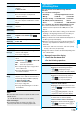
Mail icon
See page 110 for Feel
*
Mail.
Text of mail
(blue) SMS messages in the FOMA phone
SMS messages on the UIM
Melody file
Image file
Inserted image file (for List only)
i-motion movie file
PC Movie file
ToruCa file
PDF file
Document file
Phonebook entry file
Schedule event or ToDo item file
Bookmark file
Other files
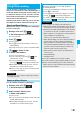
Attached file before obtaining
(for detailed display only)
Attached file suspended to be obtained
(for detailed display only)
Attached file failed to be obtained
(for detailed display only)
i-
α
ppli start information (for List only)
i-
α
ppli mail (for List only)
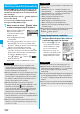
Multiple files (for List only)
Multiple pasted files
File set with the UIM restrictions
Attached file
i-
α
ppli mail
File set with the UIM restrictions