
User's Manual Part 2



184
Mail
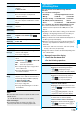
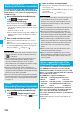
You can reply to the sender. With “Reply with quote”,
you can quote the original text in your received i-mode
mail and reply to it. You cannot use “Reply with quote”
for SMS messages.
1
Inbox List/Detailed Received Mail display
i
()
Reply/forward
Reply or Reply with quote
p
You can reply also by pressing
l
().
p
If other recipients of the simultaneous mail are found,
you can choose whether to reply to the sender only or to
all addresses.
Select “To sender” or “To all”.
p
Just one quotation mark (see page 199) is added to the
beginning of the text in the i-mode mail to be replied
with quote.
2
Enter a subject and text and send.
When you have selected i-mode mail, go to step 3 on
page 172.
When you have selected an SMS message, go to step 3
of “Composing SMS Messages to Send” on page 206.
After you send mail, “ ” changes to “ ”.
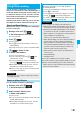
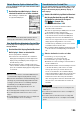
You can forward the i-mode mail or SMS messages to others.
1
Inbox List/Detailed Received Mail display
i
()
Reply/forward
Forward
p
You can forward also by pressing
m
( ) from the
Inbox List.
Reply Reply with Quote
Replying to Received i-mode Mail
<>< >
Information
p
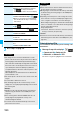
For the sender’s address that cannot be replied to (such as
when the mail address exceeds 50 half-pitch characters),
“ ” is displayed.
p
“Re:” is prefixed to the subject of the mail message to be
replied or replied with a quotation. When the subject
exceeds 100 full-pitch characters, the excess part is
deleted. (When “Re:” has already been prefixed, it changes
to “Re2:” and will be counted up to“Re99:”.)
p
Even if the i-mode mail text contains pasted data, you
cannot quote it in your reply. Also, you cannot quote it when
using the DoCoMo keitai datalink or infrared data exchange
function. See page 188 for pasted data.
p
If the text of Deco-mail contains images that are prohibited
from being attached to mail or being output from the FOMA
phone to other devices, such images will be deleted when
you reply to it.
Forward
Forwarding Received i-mode Mail
<>
2
Enter an address and send the mail.
When you have selected an i-mode mail message, go to
step 2 on page 172.
When you have selected an SMS message, go to step 2
on page 206.
After you send mail, “ ” changes to “ ”.
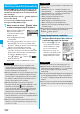
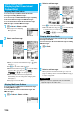
You can receive up to 2 Mbytes of the attached files on
your FOMA phone. However, you receive only the
attached file information for the files in excess of 100
Kbytes, so you need to manually obtain those attached
files from the i-mode Center.
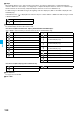
The FOMA phone supports following files:
・
Still image
・
Moving image/i-motion movie
・
Melody
・
PDF file
・
PC movie
・
ToruCa file
・
Phonebook entry
・
Schedule event
・
ToDo item
・
Bookmark (i-mode, Full Browser)
・
Word
・
Excel
・
PowerPoint
You cannot play back or display the files other than
above. You can save them to any folder in “SD other
files”, or use the i-mode mail to forward them.
You can use “Attachment preference” to select the files
to be received.
p
When multiple data items are pasted, they might not be
displayed.
Information
p
“Fw:” is prefixed to the subject of the mail message to be
forwarded. When the subject exceeds 100 full-pitch
characters, the excess part is deleted. (When “Fw:” has
already been prefixed, it changes to “Fw2:” and will be
counted up to“Fw99:”.)
p
When you forward an i-mode mail message with a file you
have not obtained yet, the file information is deleted.
p
Even if the i-mode mail text contains pasted data, you
cannot quote it in your forwarding mail. Also, you cannot
quote it when using the DoCoMo keitai datalink or infrared
data exchange function. See page 188 for pasted data.
p
When a mail message is forwarded and a ToruCa file
(details) that contains data whose output from the FOMA
phone is prohibited is attached to the mail message, the
attached file returns to a ToruCa file before obtaining
details.
p
When a mail message on the microSD memory card is
forwarded, the attached file is deleted.
p
When you “Forward” a mail/SMS message received to
Number B/Address B in Dual Mode of 2in1, the sent mail
message is retained in the Outbox or Draft, even if you
switch to A Mode.
When i-mode Mail with Files
Attached/Pasted is Received