
User's Manual Part 2



179
Mail
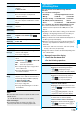
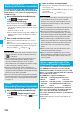
Sort
You can change the order of displayed
templates.
Select an order.
Edit title
Enter a title.
p
You can enter up to 15 full-pitch/30
half-pitch characters.
Info
You can display the file size, saved date and
time of the template, and whether it contains
images.
No. of
messages
You can display the number of stored
templates.
Delete
(Delete this)
Delete this
YES
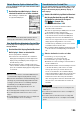
Delete
(Delete
selected)
Delete selected
Put a check mark for
templates to be deleted
l
()
YES
Delete
(Delete all)
Delete all
Enter your Terminal Security
Code
YES
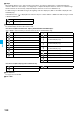
Function Menu of the Detailed Template Display
Function menu
Operation/Explanation
Function menu
Operation/Explanation
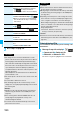
Compose
message
You can compose Deco-mail using the
contents of the template.
Go to step 2 on page 172.
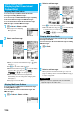
Edit
You can edit the contents of the template and
save it.
Edit the text
Oo
()
YES or NO
YES
. . . Overwrites and saves.
NO
. . . . Saves as a separate file.
p
See step 2 through step 3 on page 176 for
how to edit the text.
p
See page 162 when the templates are
stored to the maximum.
Save insert
image
You can save images inserted into the
template or Deco-mail text, and set them as
the Stand-by display and Wake-up display.
Select an image
YES
Select a destination folder.
Go to step 3 on page 159.
p
See page 162 when images are stored to
the maximum.
Information
<Edit>
p
The title name when saved as a separate file takes “YYYY/
MM/DD hh:mm”
(Y: Year, M: Month, D: Date, h: hour, m: minute).
<Save insert image>
p
Decomail-pictographs are saved to the “
お気に入り
(Favorite)” folder in the “Decomail-pictograph” folder.
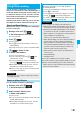
You can send an i-mode mail message with files
attached.
You can attach following files:
・
Still image
・
Moving image/i-motion movie
・
Melody
・
PDF file
・
ToruCa file
・
Phonebook entry
・
Schedule event
・
ToDo item
・
Bookmark (i-mode, Full Browser)
・
Word
・
Excel
・
PowerPoint
・
SD other files
You can attach up to 10 files within 2 Mbytes in total.
p
You cannot attach files that are prohibited from being
attached to mail or output from the FOMA phone to other
devices.
p
Regardless of the “File restriction” setting, you can attach the
still image or moving image/i-motion movie shot with your
FOMA phone or the files received via infrared rays.
p
When you attach a file, another attachment field appears on
the Message Composition display.
p
When the receiving end is not the model described below
※
,
it receives only compatible files within the memory space of
that model.
※
903i series, 904i series, 905i series, 703i series (except
P703i
f
), 704i series (except P704i
f
)
p
It might take a time to send the i-mode mail depending on the
size of attached files.
1
Message Composition display
Select the attachment field
Do the following operations.
Attachments
Attaching Files
<>
Item
Operation/Explanation
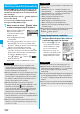
Picture
Select a folder
Select an image.
p
Highlight an attached image and press
Oo
( ) to display the image.
Press
r
to return to the former display.
Melody
Select a folder
Select a melody.
p
Highlight an attached melody and press
Oo
( ) to play back the melody.
Press any key to stop the playback.
i
motion
Select a folder
Select an i-motion movie.
p
Highlight the attached i-motion movie and
press
Oo
( ) to play back the i-motion
movie.
Press
r
during playback or stop the
playback to return to the former display.
ToruCa
When the ToruCa file is a ToruCa file (details),
it is attached as a ToruCa file (details).
Select a folder
Select a ToruCa file.
p
Highlight the attached ToruCa file and press
Oo
( ) to preview it. Press
r
to
return to the former display.
ᵡᶍᶌᶒᶇᶌᶓᶃᶂ