
User's Manual Part 2



168
i-mode/i-motion/i-Channel
i-motion movies are composed of video, sound and
music, and you can play them back obtaining from
i-motion compatible sites into your FOMA phone. You
can set the i-motion movie for a ring tone.
Two types of i-motion movies are available as shown
below. The type of the obtained i-motion movie differs
depending on the site or file.
You can save up to 10 Mbytes per i-motion movie.
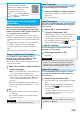
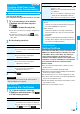
1
Select an i-motion movie from an i-motion
obtainable site
Play
See page 281 for the operation
during playback.
p
If an i-motion movie can be
played back during obtaining, it
will be played back during
obtaining.
p
If “
i
motion auto-play” is set to
“ON”, the i-motion movie will be
played back automatically after it
is obtained.
p
Select “Property” to display the i-motion information.
(See page 282)
p
See page 158 to save a screen memo.
What is i-motion?
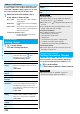
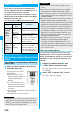
Categories
DescriptionType Playback
type
Standard
(normal)
type
(can be
saved)
Plays back
after
obtaining
Plays back after obtaining all
the data of an i-motion movie.
Plays back
while
obtaining
Plays back while obtaining an
i-motion movie. After
obtaining, you can play it back
in the same way as “Plays
back after obtaining”.
Streaming
type
(cannot be
saved)
Plays back
while
obtaining
Plays back while obtaining an
i-motion movie. The data is
deleted after playback, so you
cannot play it back again or
save it to the FOMA phone.
Obtain i-motion Movie
Obtaining i-motion Movies from
Sites
Play Back an i-motion Movie Obtained
from a Site
<>
Obtaining Completion
display
Information
p
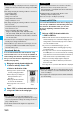
Depending on the accessed site or an i-motion movie, you
might not be able to obtain the data or play it back during
obtaining, or play it back after obtaining. Also, you cannot
obtain an i-motion movie in ASF format.
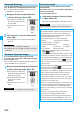
You can save the obtained i-motion movie to your
FOMA phone and set it for a ring tone, the Stand-by
display, and the Wake-up display. You can save up to
101.6 Mbytes of files including other data files. (See
page 443)
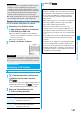
1
Obtaining Completion display
Save
YES
Select a destination folder.
p
See page 162 for when i-motion movies are stored to
the maximum.
2
Select “YES” to execute “Set
i
motion”.
Go to “Set
i
motion” on page 282.
p
See page 281 for the file formats of playable i-motion
movies.
p
Even when you stop playing back the data of standard
(normal) type while obtaining, obtaining still continues.
p
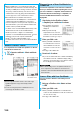
Even if “
i
motion auto-play” is set to “ON”, the data is not
automatically played back after obtaining when it is played
back while obtaining.
p
For an i-motion movie that has restrictions on the number of
playbacks, playable period, or playable deadline, “ ” is
displayed at the head of the title. An i-motion movie with the
playable period restricted cannot be played back before or
after the restriction period. If you remove the battery and
keep it aside for a long time, the date/time information in
your FOMA phone might be reset. In that case, you cannot
play back the i-motion movie that has restrictions on the
playable period and playable deadline. See page 282 for
checking the playback restrictions.
p
Depending on the line speed, line state, or radio wave
conditions, the playback during obtaining might be
suspended or the images might be distorted. You can
repeatedly play back the standard (normal) type of i-motion
movies after obtaining, but cannot play back the streaming
type of i-motion movies.
Save an i-motion Movie
Information