
User's Manual Part 2



167
i-mode/i-motion/i-Channel
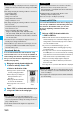
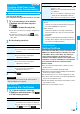
You can revoke the downloaded user certificate.
1
Site display of the FirstPass Center
Other settings
Revoke your certificate
YES
Enter your PIN2 code.
p
Enter your PIN2 code within 60 seconds. When the
code is not entered within 60 seconds, the connection is
cut off as an error entry.
p
See page 118 for PIN2 code.
2
Continue
Continue
Continue
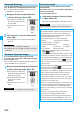
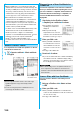
You can set the host for downloading the user certificate.
1
i
Operate certificate
Certificate host
Highlight <Not recorded> and press
l
().
p
If you select a stored host, the setting is changed to that host.
p
To delete the stored host, press
i
( ), select “Delete”,
enter your Terminal Security Code, and then select “YES”.
2
Enter your Terminal Security Code
Do the following operations.
Information
p
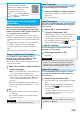
If you try to connect to the FirstPass site without the user
certificate or when its available period is expired, the
confirmation display appears asking whether to continue
connecting to the site. Select “NO”
to return to the previous
page. Download or update the user certificate from the
FirstPass Center site and then access the site again.
p
The packet communication fee for accessing the FirstPass
site is included in Pake-Houdai or Pake-Houdai Full.
Request Revocation of User Certificate
Information
p
To use FirstPass after revoking a certificate, you need to apply
again for your user certificate to be issued and then download it.
p
See page 165 for how to view the download user certificate.
Certificate Host
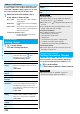
Changing a CA Center
※
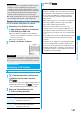
Normally, you do not need to change this setting.
<>
Item Operation/Explanation
Default URL
Enter a default URL.
p
You can enter up to 100 half-pitch
alphanumeric characters.
Host address
Enter a host address.
p
You can enter up to 99 half-pitch
alphanumeric characters.
3
Press
l
().
■
Before Using FirstPass
p
FirstPass is DoCoMo’s electronic certification service. By
using FirstPass, client authentication is enabled, whereby
the site and your FOMA phone exchange certificates,
check the other party’s certificate and perform mutual
authentication.
p
When requesting issue of a user certificate, carefully read
“The usage regulation (Japanese only)” on the display,
agree to this, and then make the request.
p
You need to enter the PIN2 code to use the user
certificate. Once you have entered your PIN2 code, all
subsequent operations will be deemed to be done by you,
so be careful not to let anyone else use your UIM or PIN2
code.
p
If your UIM is lost or stolen, “DoCoMo Information Center”
on the back page of this manual can revoke your user
certificate.
p
DoCoMo bears no obligation or responsibility with regard
to the sites and information provided by FirstPass sites.
Please solve the problem between you and FirstPass sites.
p
DoCoMo and the CA do not guarantee security when you
use FirstPass and SSL, so you should use them on your
own judgment and responsibility.