
User's Manual Part 2



160
i-mode/i-motion/i-Channel
You can download melodies and set them as a ring
tone and other tones. You can save up to 3,500 files in
total including other data files, however, the number of
files you can save decreases depending on the data
volume. (See page 444)
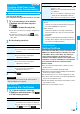
1
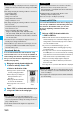
Bring up a melody downloadable site
Select a melody
Save
YES
Select a destination folder.
p
See page 290 for operations while
a melody is being played back.
p
Select “Property” to display the
melody information. (See
page 291)
p
See page 162 when melodies
are stored to the maximum.
p
See page 158 to save a screen
memo.
2
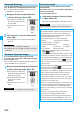
Select “YES” to set the downloaded melody as
a ring tone
Select an incoming type
.
p
Even when an image is displayed on the site, it might not be
displayed on the Picture viewer after saving it to the FOMA
phone.
p
The image satisfying the following conditions is saved as a
Decomail-pictograph:
・
GIF or JPEG image
・
Image of 20 x 20 dots
・
Image without file restrictions
・
Image of 6 Kbytes or less
p
The image satisfying the following conditions is saved as a
frame or a mark:
・
Transparent GIF (except animation GIF)
・
The extension is “ifm”.
・
Image of Stand-by (480 x 854) or smaller
Images of Stand-by (480 x 854), VGA (640 x 480),
CIF (352 x 288), QVGA (240 x 320), QCIF (176 x 144),
and Sub-QCIF (128 x 96
)
are saved as frames, and others
are saved as marks.
p
You can save up to 100 Kbytes per image via i-mode, or
500 Kbytes per image via Full Browser.
p
For Full Browser, you cannot save some images. You can
save images in BMP format and PNG format only to the
microSD memory card.
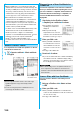
Download Melody
Information
Obtaining Completion
display
Information
p
For some melodies, the play part might have been
specified. If you set the play-part-specified melody for a ring
tone, it is played back according to the setting of “Position to
play” of “Melody effect”.
p
Some downloaded melodies might not be played back
successfully.
You can download PDF files from sites for display. You
can save up to 3,500 files in total including other data
files, however, the number of files you can save
decreases depending on the data volume. (See
page 444)
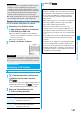
1
Bring up a PDF file downloadable site
Select a PDF file.
p
With the PDF file that cannot be displayed unless you
download all pages, the confirmation display appears
asking whether to download all pages. Select “YES” to
select the destination folder.
p
If you have not downloaded all pages, you can
additionally download the remaining pages by using
“Download remain”.
p
See page 310 for how to save the displayed PDF file to
the FOMA phone. You can save the PDF file containing
pages that have not been downloaded or the PDF file of
which download was suspended midway as well.
p
The password entry display might be displayed
depending on the PDF file. Enter the password, and
then select “OK”.
p
See page 307 for operations while PDF file is displayed.
p
Up to 36 half-pitch characters are saved for a file name.
When the file name is not specified, a part of the
downloaded URL or “melodyxxx” (xxx denotes numerals) is
saved as the file name.
p
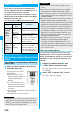
Untitled melodies are indicated by “No title” on the
Obtaining Completion display or list.
p
You can save up to 100 Kbytes per melody.
Download PDF File
Information
Information
p
The file size of the PDF file you can download from i-mode
sites is up to 2 Mbytes. You cannot download the PDF file in
excess of 2 Mbytes.
p
You might be able to display the failed-to-download PDF file
by re-downloading.