
User's Manual Part 2




158
i-mode/i-motion/i-Channel
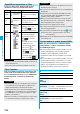
Attach to mail
You can send i-mode mail with the bookmark
attached.
Go to step 2 on page 172.
Move
You can move bookmarks or screen memos
to another folder.
Select a destination folder
Put a check
mark for bookmarks or screen memos to
be moved
l
()
YES
Edit title
Edit the title.
p
For Bookmark, you can edit the title also
pressing
m
( ) on the listing display
or detailed display.
p
You can enter up to 12 full-pitch/24
half-pitch characters for a bookmark. If you
press
Oo
( ) with a blank, the URL
without “http://” or “https://” is registered.
p
You can enter up to 11 full-pitch/22
half-pitch characters for a screen memo. If
you press
Oo
( ) with a blank, the
screen memo is registered as “No title”.
Copy
(Copy URL)
You can copy the URL of the bookmark.
Select a start point for copying
Select an end point for copying.
p
See page 361 for how to paste copied characters.
Copy
(Copy to
microSD)
See page 295.
Set as home
URL
You can store the site as Home URL of Full Browser.
YES
p
You can operate this only from the
Bookmark List of Full Browser.
Add desktop
icon
See page 114.
Ir/
transmission
(Send Ir data)
See page 305.
Ir/
transmission
(
transmission)
See page 306.
No. of
bookmarks
You can display the number of bookmarks
stored in the displayed folder.
Delete
[Delete
(Delete this)]
Delete (Delete this)
YES
Delete
(Delete
selected)
Delete selected
Put a check mark for
bookmarks or screen memos to be deleted
l
()
YES
Delete
(Delete all)
You can delete all bookmarks or screen
memos stored in the folder.
Delete all
Enter your Terminal Security
Code
YES
Function menu
Operation/Explanation
You can save a displayed page as a screen memo to
the FOMA phone. You can display the page saved as a
screen memo without connecting to i-mode.
You can save up to 100 screen memos, however, the
number of screen memos you can save decreases
depending on the data volume.
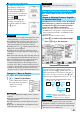
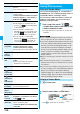
1
From a page to be saved
i
()
Screen memo
Add screen memo
YES
Select a destination folder.
p
See page 162 when screen memos are stored to the
maximum.
1
i
Screen memo
2
Select a folder
Select a screen memo.
p
Use
No
to check other screen memos.
Screen Memo
Saving Site Contents
Save as a Screen Memo
<>
Information
p
Up to 11 full-pitch/22 half-pitch characters are stored for a
title. For longer titles, the excess characters are deleted.
p
If you save the Obtaining Completion display, its data file is saved
as well. (The Obtaining Completion display for Chaku-uta Full
®
music files, for i-motion movies with playable deadline, or for the
ToruCa files whose output from the FOMA phone is prohibited
cannot be saved.) Some Obtaining Completion displays cannot be
saved as screen memos. The display except the Obtaining
Completion display is saved with a URL of that page of up to 256
half-pitch characters.
p
When you save SSL pages, their SSL certificates are saved
as well.
p
The contents entered in the text box, or selected with the
pull-down menu, check box, or radio button are not saved to
screen memos.
p
You can save up to 100 Kbytes per page. However, you can
save up to 500 Kbytes of the i-motion Obtaining Completion
display, up to 200 Kbytes of the Template Obtaining
Completion display, up to 1 Kbyte of the ToruCa Obtaining
Completion display, and up to 20 Kbytes of the Download
Dictionary Obtaining Completion display.
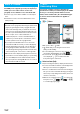
Display a Screen Memo
Screen Memo Folder List
Screen Memo List Detailed Screen Memo
display