
User's Manual Part 2



140
Camera
3
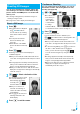
Select a still image and press
c
()
Oo
()
p
Press
No
from the detailed display to show the
previous or next still image.
p
To save the still image as a mirrored image (horizontally
reversed), press
i
( ) and select “Mirror save”.
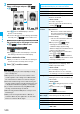
Put a check mark for still images to be saved
l
()
Save or Mirror save
l
()
Save or Mirror save
p
Press
r
from the Post View display to cancel the
shot still image and return to the Finder display.
4
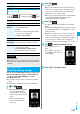
Select a destination folder.
p
When you set “Store in” to “microSD”, the still image is
saved to the folder selected by “Select storage”.
5
Press
h
to end the camera.
To select a still image and save it
To select multiple still images and save them
To save all still images
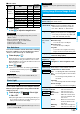
Post View display Detailed display
c
Information
p
The image quality may be coarse depending on “Image
size” or “Display size”.
p
When you shoot, the tone selected for “Shutter sound”
sounds regardless of the settings such as Manner Mode.
The sound volume for shutter tone cannot be changed.
p
Even when a mail message comes in while shooting, the
shooting operation continues. Though unread message icon
is displayed, the Mail Receiving display is not displayed.
p
If you end the camera function by using Multitask while
shooting, unsaved still images are deleted.
p
When shooting, hold the FOMA phone securely to avoid
blurred images.
p
While you are shooting in Photo Mode or “Manual” of
Continuous Mode, the photo light flickers. In “Auto”/“Auto
bracket” of Continuous Mode, it lights.
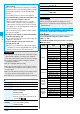
Function Menu of the Post View Display in Photo
Mode/Detailed Display in Continuous Mode
Function menu
Operation/Explanation
Save
See page 139 and page 140.
Mirror save
See page 139 and page 140.
Attach to mail
You can save the still image you shot and
attach it to i-mode mail.
Select a folder.
Go to step 2 on page 172.
p
You can compose an i-mode mail also by
pressing
l
().
Attach
location
Select an item.
By position loc.
. . Measures the current location and store
the location information. After checking the
location information, press
Oo
().
From loc. history
. . . Select a location information detail from
Location History and store it.
p
When you press
i
( ) during
measuring the current location, the
confirmation display appears asking
whether to display the result obtained so far
from the location information.
p
To cancel measuring the current location,
press
r
or
l
().
p
Press
l
( ) from the confirmation
display for the location information to restart
measuring in “Quality mode”.
Set display
You can paste the still image to the Stand-by
display and others for displaying. This is
available only in Photo Mode.
Select a folder.
Go to “Set display” on page 274.
p
Even when “Store in” is set to “microSD”,
the still image is saved to the FOMA phone.
Change frame
You can replace the frame added to the shot
still image by new one. This is available only
in Photo Mode.
Select a frame.
p
Press
No
to bring up the previous or next
frame.
p
To reselect a frame, press
l
().
Oo
()
p
You cannot release the frame.
Normal display/
Mirror display
You can switch between a correct image and
a mirrored image (horizontally reversed).
Store in
See page 144.
Display size
See page 145.
File restriction
See page 146.
Icon
You can set whether to display icons.
ON or OFF