
User's Manual Part 2




156
i-mode/i-motion/i-Channel
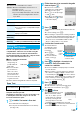
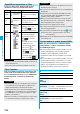
If you register frequently used sites in My Menu, you
will be able to access them easily.
You can register up to 45 sites.
1
Bring up a page to be registered
Register My Menu
p
The page configuration differs depending on the site.
2
Select the i-mode password text box
Enter the i-mode password
決定
(OK)
p
The entered i-mode password is displayed as “
_
”.
p
See page 118 for the i-mode password.
1
i
i
Menu
English iMenu
My Menu
Select a site to be accesse
d.
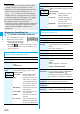
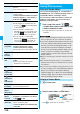
The i-mode password (four digits) is required to
subscribe to and unsubscribe from message services
and i-mode pay sites, and to do i-mode mail settings.
Be sure not to let others know your i-mode password.
1
i
i
Menu
English iMenu
Options
Change i-mode Password
Select the “Current Password” text box
Enter the i-mode password (four digits).
p
If you enter the i-mode password for the first time, enter
“0000” (four zeros) which is set at a time of your
contract.
p
The entered numeral is displayed as “
_
”.
My Menu
Using My Menu
Register Sites in My Menu
<>
Information
p
Some sites cannot be registered in My Menu.
p
When you subscribe to a pay site in
メニュー/検索
(Menu/
Search) and Menu List, it will be registered in My Menu
automatically.
Access Sites from My Menu
Information
p
If you are using Dual Network Service, you might not be
able to use My Menu registered by the mova phone using
the FOMA phone, or My Menu registered by the FOMA
phone using the mova phone.
Change i-mode Password
Changing i-mode Password
<>
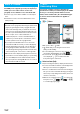
2
Select the “New Password” text box
Enter a new i-mode password (four digits).
p
Enter your own i-mode password.
3
Select the “New Password (Confirmation)”
text box
Enter the new i-mode password
(four digits)
Select
p
Enter the same number that you entered in step 2.
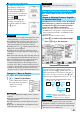
1
i
Go to location
<NEW>
2
Enter a URL
OK
p
You can enter up to 256 half-pitch alphanumeric
characters and symbols (up to 512 half-pitch characters
for Full Browser).
p
For Full Browser, the confirmation display appears
telling that the web page might not be displayed.
Up to 10 entered URLs can be stored in URL History.
1
i
Go to location
Select a URL to be displayed
OK
p
Excluding “http://” and “https://”,
up to 22 half-pitch characters
can be displayed.
p
You can edit the URL by
selecting the URL’s text box.
Information
p
Note that if you do not remember the i-mode password, you
need to bring an identification card such as your driver’s
license to the handling counter of a DoCoMo shop.
Enter URL
Displaying Internet Web Pages
<>
Information
p
For i-mode, Internet web pages not supporting i-mode or
some type of internet web pages to be connected might not
be displayed correctly.
p
When the file size of the page you have received exceeds
the maximum obtainable size of a page, receiving is
suspended. The data obtained so far might be displayable
by selecting “OK”.
Displaying Web Pages from URL History
URL History List
Information
p
When the entered URLs exceed 10 items, the URL histories
are overwritten automatically, starting from the oldest one.