
User's Manual Part 2




293
Data Display/Edit/Management
You need to obtain a microSD memory card separately
to use the functions related to the microSD memory
card. The microSD memory card is available at mass
retailers for home electric appliances etc.
p
FOMA P905i supports a commercial microSD memory card
of up to 2 Gbytes and microSDHC memory card of up to 4
Gbytes (As of October 2007).
For the latest operation check information such as the
memory capacity and manufacturers of microSD memory
cards, access the following sites (Japanese only). Note that
the microSD memory cards other than published in the sites
might not correctly work.
・
From i-mode to P-SQUARE (As of
October 2007)
i
Menu
→
メニュー/検索
(Menu/Search)
→
ケータイ電話メーカー
(Mobile Phone
Maker)
→
P-SQUARE
・
From personal computers
http://panasonic.jp/mobile/
Note that the published information is the result obtained
from the operation check, which does not necessarily
guarantee all performances of those microSD memory cards.
p
During processing of the card, “ ” is displayed. During
processing of the card, never remove the microSD memory
card, or turn off the FOMA phone. Check that processing of
the card does not go on before turning off the FOMA phone,
and then remove the microSD memory card.
p
Folders and files in the microSD memory card are
recognized up to about 66,500 items.
p
When the FOMA phone or microSD memory card has many
data files, it may take longer to access the files.
p
The microSD memory card has an operating life. If you use
the microSD memory card for a long time, you may not be
able to write new data on it, or the card may be disabled.
Move to phone
See page 298.
Reset title
You can reset the title to the default.
YES
Move
See page 275.
Delete this
See page 275.
Delete all
You can delete all files in the folder.
Enter your Terminal Security Code
YES
Multiple-choice
See page 276.
Memory info
You can check the used memory space
(estimate)/number of stored items.
Sort
See page 276.
Listing
You can change the displayed contents for
the Kisekae Tool List.
Title or Image
p
You can switch by pressing
c
()
from the Kisekae Tool List.
About microSD Memory Card
Function menu
Operation/Explanation
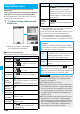
QR code for
accessing the site
p
With the FOMA phone, you can save the downloaded still
images, i-motion movies, melodies, Kisekae Tool files,
Chaku-uta Full
®
music files, and i-
α
ppli programs with the file
restrictions to the microSD memory card. You cannot save
the files IPs (Information Providers) do not permit.
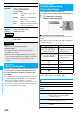
■
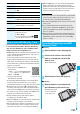
Inserting
1
Remove the back cover. (See page 41)
2
Face the front surface of the microSD
memory card upwards and insert the
memory card.
p
Push it until it clicks.
3
Attach the back cover. (See page 41)
■
Removing
1
Remove the back cover and push the
microSD memory card until it stops.
p
Pushing the microSD
memory card inside
pops up the card.
Information
p
You may not be able to use the microSD memory card formatted
using a personal computer and other devices. Be sure to use
the microSD memory card formatted with FOMA P905i.
p
Note that formatting deletes all the contents on the microSD
memory card.
p
If you read/write data from/on a microSD memory card
using a device other than this FOMA phone, the microSD
memory card might become unusable depending on the
device or operations.
p
When you insert a microSD memory card which has been
used with another device such as a personal computer into
FOMA P905i, new files and folders to be used in FOMA
P905i are created.
Inserting/Removing microSD
Memory Card
ᵡᶍᶌᶒᶇᶌᶓᶃᶂ