
User's Manual Part 2




288
Data Display/Edit/Management
Chara-den is an animation character representing yourself.
You can send it as your image during videophone calls.
You can use the Chara-den player to play back and
shoot them.
p
You can delete the pre-installed Chara-den image. You can
re-download it from the “P-SQUARE” site (see page 163).
When you use a UIM other than the one used for
downloading, the UIM restrictions (see page 39) are set to it.
p
Some Chara-den images synchronize their movement with
your voice spoken into the microphone.
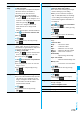
Sound
(Equalizer)
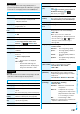
You can change the quality of sound from an
earphone or Bluetooth device.
Sound effect
Equalizer
Select an item.
Normal
. . . . . Reproduces normal sound
quality.
Dynamic
. . . Makes the sound dynamic by
accentuation.
Voice
. . . . . . Makes conversation audible.
Train
. . . . . . Minimizes abnormal sound that
causes sound leakage.
Sound
(Main/sub
sound)
Main/sub sound
Main sound, Sub sound,
or Main+sub sound
Caption
You can set whether to display the caption.
ON or OFF
Information
<Slow>
p
No sound is output during slow playback.
<Position to play>
p
You might not be able to select the position to play
depending on the videos.
p
When you have selected the part that was not recorded
correctly owing to bad radio wave conditions, the start point
moves to the part where you can play back the video
correctly.
Chara-den
What is Chara-den?
Function menu
Operation/Explanation
At player start-up
Main sound
<
>
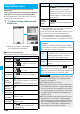
You can display stored Chara-den images.
You can press keys to make the Chara-den image move.
1
m
Data box
Chara-den
Select a Chara-den image.
■
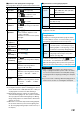
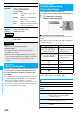
Key assignment of operating Chara-den
You can use the Action List to check the actions that you can
operate.
p
The number of actions you can operate differs depending on
the Chara-den image.
※
1
You cannot operate for the pre-installed Chara-den image.
※
2 Press
s
again to cancel the first
s
.
Chara-den Player
Displaying/Operating
Chara-den Images
<>
Chara-den List Chara-den display
Key operation Details
1
〜
9
s1
〜
s9
※1※2
(Whole Action Mode)
Whole action:
expresses an action with
whole of the body.
11
〜
99
※1
(Parts Action Mode)
Parts action:
expresses an action with
a part of the body.
0
Suspends the running
action.
m
Displays the Action List.
l
Makes a videophone call.
c
Records Chara-den
images.
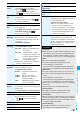
Function Menu of the Chara-den List
Function menu
Operation/Explanation
Chara-den call
See page 69.
Substitute
image
See page 69.
Rec. Chara-den
See page 289.
Edit title
Enter a title.
p
You can enter up to 18 full-pitch/36
half-pitch characters.
File property
You can display the title, file name, and
others of the Chara-den image.
Memory info
You can display the used memory space
(estimate).